# Group Panel
Develop powerful and lightweight web applications using ASP.NET MVC controls. Learn more about the ComponentOne MVC controls in ASP.NET MVC documentation.
## Content
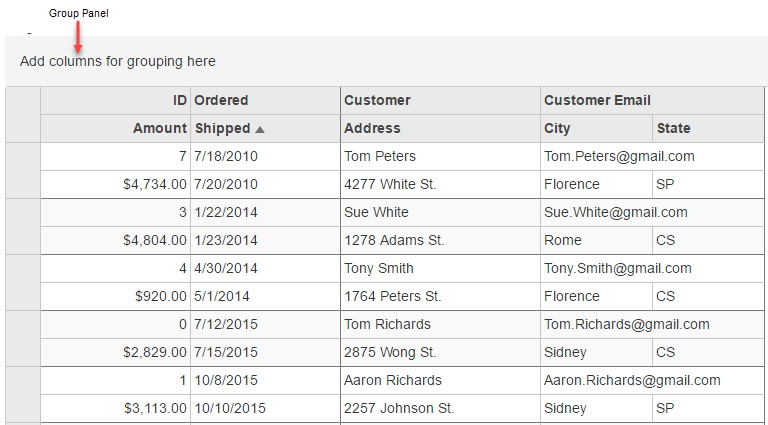
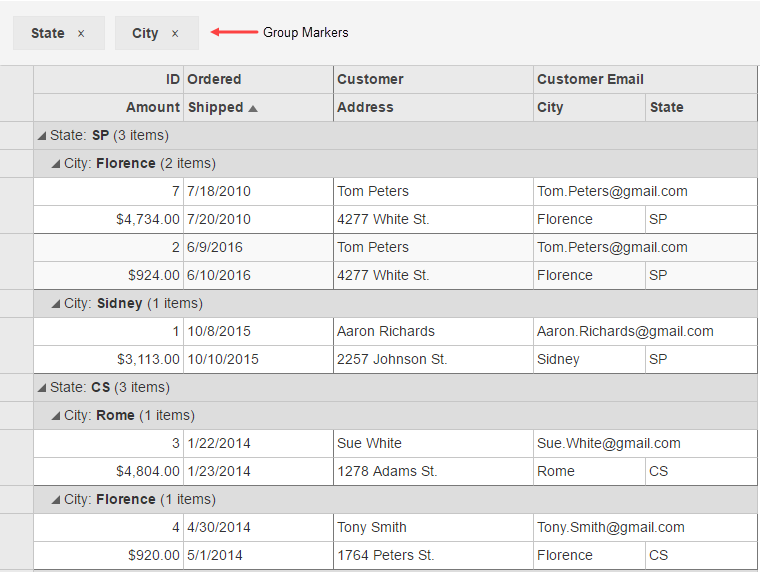
The MultiRow control provides the flexibility to group and ungroup grid data as per the requirement at run-time. Group panel enables you to drag and drop desired columns from the MultiRow control for grouping.
It is possible to move groups within the panel to change the grouping order of the grid data. Moreover, clicking a group marker in the panel enables sorting of the groups, based on the particular column entries.
To set the maximum number of groups to allow in group panel, set the **MaxGroups** property. Set the **Placeholder** property to the string you want to display in the panel when it contains no groups.
The following images display grouping columns using Group Panel in MultiRow. This example uses the sample created in the [Quick Start](/componentone/docs/mvc/online-mvc/workwithcontrols/MultiRow/QuickStartAddDataMultiRow) topic.
**In Code**
```razor
@(Html.C1().MultiRow()
.Bind(bl => bl.Bind(Model))
.AllowDragging(C1.Web.Mvc.Grid.AllowDragging.Columns)
.ShowGroupPanel(s => s
.MaxGroups(4)
.Placeholder("Add columns for grouping here"))
.LayoutDefinition(ld =>
{
ld.Add().Header("Order").Colspan(2).Cells(cells =>
{
cells.Add(cell => cell.Binding("Id").Header("ID").CssClass("id").Width("150"))
.Add(cell => cell.Binding("Date").Header("Ordered").Width("150"))
.Add(cell => cell.Binding("Amount").Header("Amount").Format("c").CssClass("amount"))
.Add(cell => cell.Binding("ShippedDate").Header("Shipped"));
});
ld.Add().Header("Customer").Colspan(3).Cells(cells =>
{
cells.Add(cell => cell.Binding("Customer.Name").Name("CustomerName").Header("Customer").Width("200"))
.Add(cell => cell.Binding("Customer.Email").Name("CustomerEmail").Header("Customer Email").Colspan(2))
.Add(cell => cell.Binding("Customer.Address").Name("CustomerAddress").Header("Address"))
.Add(cell => cell.Binding("Customer.City").Name("CustomerCity").Header("City"))
.Add(cell => cell.Binding("Customer.State").Name("CustomerState").Header("State"));
});
}))
```
## See Also
[Grouping](/componentone/docs/mvc/online-mvc/workwithcontrols/MultiRow/workwithmultirow/MultiRowGrouping)
[Quick Start](/componentone/docs/mvc/online-mvc/workwithcontrols/MultiRow/QuickStartAddDataMultiRow)