# Collapsible Column Headers
Develop powerful and lightweight web applications using ASP.NET MVC controls. Learn more about the ComponentOne MVC controls in ASP.NET MVC documentation.
## Content
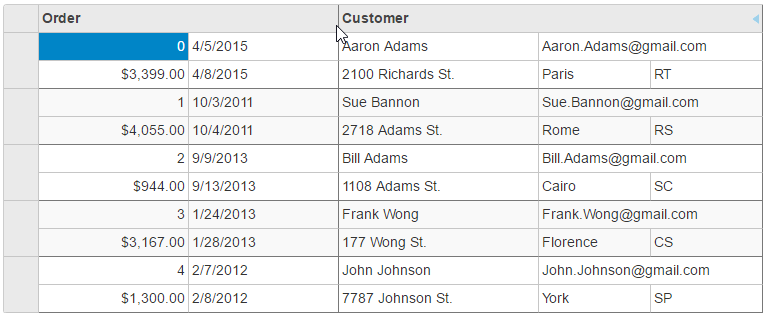
The MultiRow control can collapse the column headers to a single line, showing only the group names rather than individual cells. The MultiRow control, by default show column headers that span multiple rows and shows the header for each cell defined in the LayoutDefinition. This saves space at the expense of having individual cell headers.
The following image shows the MultiRow control displaying **CollapsedHeaders**. This example uses the sample created in the [Quick Start](/componentone/docs/mvc/online-mvc/workwithcontrols/MultiRow/QuickStartAddDataMultiRow) topic.
**In Code**
**CollapsedHeaders.cshtml**
To collapse the column headers, set the [CollapsedHeaders](/componentone/api/mvc/online-mvc/dotnet-framework-api/C1.Web.Mvc.MultiRow/C1.Web.Mvc.MultiRow.MultiRow-1.CollapsedHeaders.html) property to true. In these scenarios, remember to set the Header property on the groups to avoid empty column headers.
```razor
@(Html.C1().MultiRow()
.Bind(bl => bl.Bind(Model))
.CollapsedHeaders(true)
.ShowHeaderCollapseButton(true)
.LayoutDefinition(ld =>
{
ld.Add().Header("Order").Colspan(2).Cells(cells =>
{
cells.Add(cell => cell.Binding("Id").Header("ID").CssClass("id").Width("150"))
.Add(cell => cell.Binding("Date").Header("Ordered").Width("150"))
.Add(cell => cell.Binding("Amount").Header("Amount").Format("c").CssClass("amount"))
.Add(cell => cell.Binding("ShippedDate").Header("Shipped"));
});
ld.Add().Header("Customer").Colspan(3).Cells(cells =>
{
cells.Add(cell => cell.Binding("Customer.Name").Name("CustomerName").Header("Customer").Width("200"))
.Add(cell => cell.Binding("Customer.Email").Name("CustomerEmail").Header("Customer Email").Colspan(2))
.Add(cell => cell.Binding("Customer.Address").Name("CustomerAddress").Header("Address"))
.Add(cell => cell.Binding("Customer.City").Name("CustomerCity").Header("City"))
.Add(cell => cell.Binding("Customer.State").Name("CustomerState").Header("State"));
});
}))
```