# Menu with Input Number
Develop powerful and lightweight web applications using ASP.NET MVC controls. Learn more about the ComponentOne MVC controls in ASP.NET MVC documentation.
## Content
You can add different types of values to the **Menu** control that are as simple as strings shown in the [Quick Start](/componentone/docs/mvc/online-mvc/workwithcontrols/Input/Menu/MenuQuickStart), or binding Menu with another control. This section describes how Menu control is used with [InputNumber](/componentone/docs/mvc/online-mvc/workwithcontrols/Input/InputNumber) and how is the Menu's value updated with respect to value selected in the [InputNumber](/componentone/docs/mvc/online-mvc/workwithcontrols/Input/InputNumber) control.
The following image shows how the **Menu** appears after binding it to Input Number.
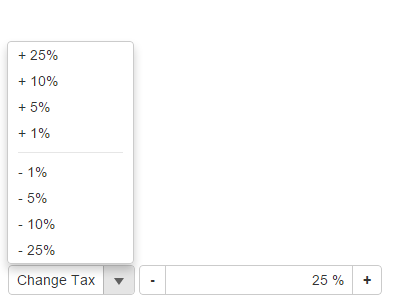
The following code examples demonstrate how to bind Menu to an InputNumber control:
#### In Code
**MenuController.cs**
```razor
public ActionResult Feature()
{
return View();
}
```
**Menu.cshtml**
```razor
@(Html.C1().Menu().Header("Change Tax")
.Command("execute", canExecute: "canExecute")
.MenuItems(items =>
{
items.Add("+ 25%", 0.25);
items.Add("+ 10%", 0.10);
items.Add("+ 5%", 0.05);
items.Add("+ 1%", 0.01);
items.AddSeparator();
items.Add("- 1%", -0.01);
items.Add("- 5%", -0.05);
items.Add("- 10%", -0.10);
items.Add("- 25%", -0.25);
})
)
@(Html.C1().InputNumber().Id("mInputNumber")
.Value(0.07).Step(0.05).Format("p0").Min(0).Max(1)
)
```