# Input Mask Types
Develop powerful and lightweight web applications using ASP.NET MVC controls. Learn more about the ComponentOne MVC controls in ASP.NET MVC documentation.
## Content
You can use InputMask control for verifying different types of data using the Mask property. For example, you can add a mask that prefixes telephone number with three-digit area code. You can also use the control with InputDate and InputTime, which prevents user to enter invalid data accidentally.
The following images show how the **InputMask** control appears after applying different masks to it.
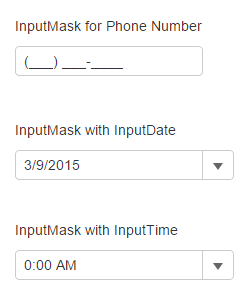
The following code examples demonstrate how to bind Menu to an InputNumber control:
#### In Code
**InputMaskController.cs**
```razor
public ActionResult Feature()
{
return View();
}
```
**InputMask.cshtml**
```razor
InputMask for Phone Number
@(Html.C1().InputMask().Mask("(999) 000-0000")
.HtmlAttributes(new { title = "Mask: (999) 000-0000" })
)
InputMask with InputDate
@(Html.C1().InputDate().Value(DateTime.Now)
.Format("d").Mask("99/99/9999")
.HtmlAttributes(new { title = "Mask: 99/99/9999" })
)
InputMask with InputTime
@(Html.C1().InputTime().Value(DateTime.Now)
.Format("t").Mask("00:00 >LL").Step(new TimeSpan(0, 15, 0))
.HtmlAttributes(new { title = "Mask: 00:00 >LL" })
)
```