# Calculation Precision

Develop powerful and lightweight web applications using ASP.NET MVC controls. Learn more about the ComponentOne MVC controls in ASP.NET MVC documentation.

## Content

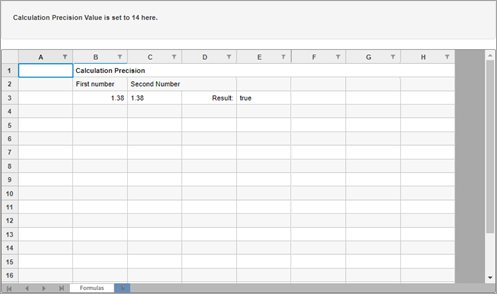
FlexSheet allows you to set the number of digits after the decimal point to round to when calculating formulas using [CalculationPrecision](/componentone/api/mvc/online-mvc/dotnet-framework-api/C1.Web.Mvc.FlexSheet/C1.Web.Mvc.Sheet.FlexSheet.CalculationPrecision.html) property of the [FlexSheet](/componentone/api/mvc/online-mvc/dotnet-framework-api/C1.Web.Mvc.FlexSheet/C1.Web.Mvc.Sheet.FlexSheet.html) class. Please note that setting the negative value for the **CalculationPrecision** property, then rounding will not be performed.
![Calculation Precision in MVC FlexSheet](https://cdn.mescius.io/document-site-files/images/2b3ac322-100e-4637-958d-fb40dcda3f44/images/flexsheet-calculation-precision.png)

The following code demonstrates the use of CalculationPrecision property. This example uses the [calculationPrecision.js](/componentone/docs/mvc/online-mvc/workwithcontrols/FlexSheet/workwithflexsheet/flexsheet-calculation-precision#calculationprecisionjs) file.

**Controller code**

```csharp
public ActionResult Index(int val = 14)
{
    int CalculationPrecision = val;
    return View(CalculationPrecision);
}
```

**View Code**

```razor
@section Scripts{
    <script type="text/javascript" src="~/Scripts/FlexSheet/calculationPrecision.js"></script>
}
<style>
    .btn {
        margin-bottom: 0;
    }
</style>
<div>
    <div class="row">
        <div class="col-md-12 col-xs-24">
            <div class="form-inline well well-lg">
                <p><b>Calculation Precision Value is set to 14 here.</b></p>
            </div>
        </div>
    </div>
    <div>
        @(Html.C1().FlexSheet().CssClass("flexSheet").Id("formulaSheet")
        .AddUnboundSheet("Formulas", 20, 8).CalculationPrecision(14).Height("500px")
        )
    </div>
</div>
```


<br>
## calculationPrecision.js

excelHTMLEntities.js

```javascript
c1.documentReady(function () {
    var flexSheet = wijmo.Control.getControl('#formulaSheet');
    generateFormulasSheet(flexSheet);
});
function SetCellContent(sender, args) {
    var flexSheet = wijmo.Control.getControl('#formulaSheet');
    let selection = args.range;
    if (selection.isValid) {
        let cellContent = document.querySelector('#cellContent');
        cellContent.textContent = flexSheet.getCellData(selection.row, selection.col, true);
    }
};

function setCalculationPrecision() {
    var precision = parseInt(document.getElementById("precisionVal").value);
    if (isNaN(precision)) {
        alert("Type a number for Calculation Precision");
        return false;
    }
    $.ajax({
        //async: false,
        method: 'POST',
        url: '/FlexSheet/SetCalculationPrecision',
        data: '{numb:' + precision + '}',
        dataType: 'html',
        contentType: 'application/json; ',
        success: function (result) {
            $('#formulaSheet').parent().html(jQuery(result).find('#formulaSheet').parent().html());
            var flexSheet = wijmo.Control.getControl('#formulaSheet');
            generateFormulasSheet(flexSheet);
        },
        error: function (xhr) {
            alert(xhr.responseText);
        }
    });
};

function generateFormulasSheet(flexSheet) {
    flexSheet.setCellData(0, 1, "Calculation Precision");
    flexSheet.setCellData(1, 1, "First number");
    flexSheet.setCellData(2, 1, "=6*0.23");
    flexSheet.setCellData(1, 2, "Second Number");
    flexSheet.setCellData(2, 2, 1.38);
    flexSheet.setCellData(2, 3, "Result:");
    flexSheet.setCellData(2, 4, "=(B3<=C3)");

    flexSheet.applyCellsStyle({
        fontWeight: 'bold'
    }, [new wijmo.grid.CellRange(0, 1, 0, 1)]);

    flexSheet.applyCellsStyle({
        textAlign: 'right'
    }, [new wijmo.grid.CellRange(2, 1, 2, 1), new wijmo.grid.CellRange(2, 3, 2, 3)]);

    flexSheet.mergeRange(new wijmo.grid.CellRange(0, 1, 0, 7));
    flexSheet.mergeRange(new wijmo.grid.CellRange(1, 2, 1, 3));
}
```