# Context Menu
Develop powerful and lightweight web applications using ASP.NET MVC controls. Learn more about the ComponentOne MVC controls in ASP.NET MVC documentation.
## Content
The FlexSheet control provides familiar features as supported by Microsoft Excel, and additional capabilities to enhance user experience. Context Menu in FlexSheet is one of these excel inspired features. Triggered by right-click, it enables you to insert or remove rows or columns in your sheet.
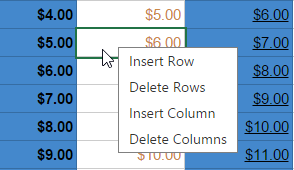
Upon right-clicking any cell or row/column header in FlexSheet, Context Menu pops up which allows you to perform following operations on your sheet.
| **Context Menu Operations** | **Description** |
| --- | --- |
| Insert Row | Adds a new row above the active row |
| Delete Rows | Deletes the active row |
| Insert Column | Adds a new column before the active column |
| Delete Columns | Deletes the active column |
## See Also
**Reference**
[BoundSheet\ Class](/componentone/api/mvc/online-mvc/dotnet-framework-api/C1.Web.Mvc.FlexSheet/C1.Web.Mvc.Sheet.BoundSheet-1.html)
[FlexSheetHelper Class](/componentone/api/mvc/online-mvc/dotnet-framework-api/C1.Web.Mvc.FlexSheet/C1.Web.Mvc.Sheet.FlexSheetHelper.html)