# Using Formulas at Runtime
Develop powerful and lightweight web applications using ASP.NET MVC controls. Learn more about the ComponentOne MVC controls in ASP.NET MVC documentation.
## Content
The FlexSheet control, just like excel, does more than simply displaying the entered or bound data. You can explore immense potential of built-in functions and perform complex calculations on your data, thereby utilizing FlexSheet as a comprehensive reporting and analysis tool.
This topic provides examples demonstrating how to work on data in FlexSheet control through in-built formulas. Using pre-defined formulas in FlexSheet is as simple as performing basic Context Menu operations. You simply select a cell, type an equal (=) sign through keyboard, and a popup appears which prompts you to select the desired formula from a list of pre-defined ones.
For example, the following image shows FlexSheet control displaying scores (out of 100) of 10 engineering students of a batch in three semester examinations. The examples below demonstrate how to use formulas to calculate sum and averages of their scores.
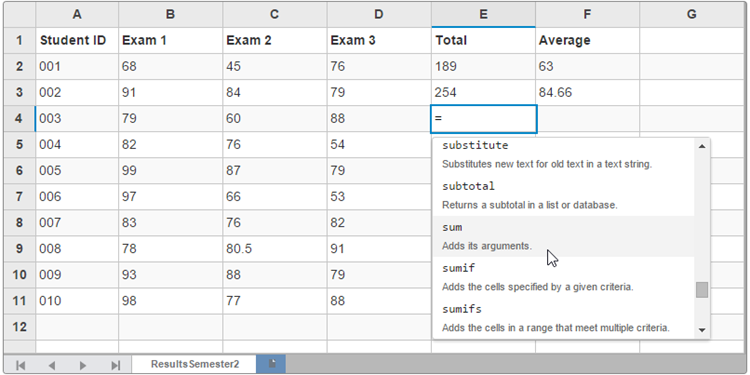
The following image shows how to use formula to calculate the sum of scores in the cell E4.

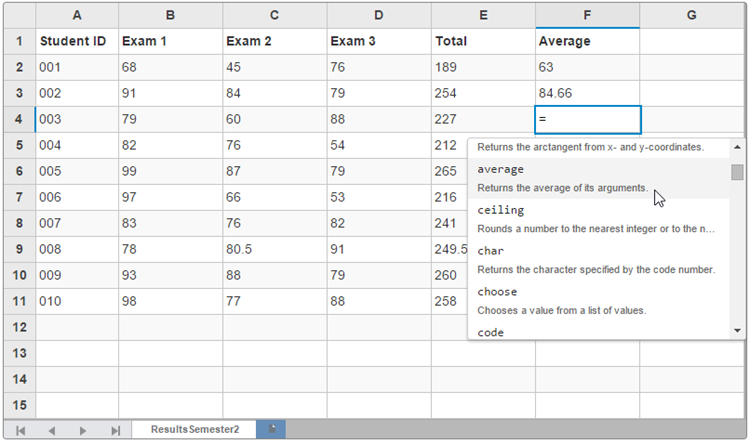
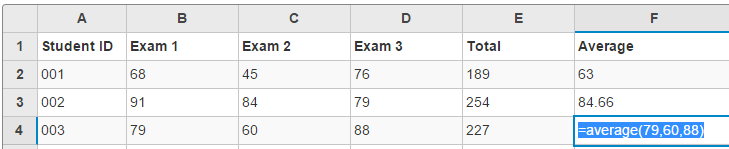
Similarly, below we average the scores of Student ID 003 in the cell F4.
In the following image, the **Ceiling** formula rounds the value in the cell C9 to a nearest integer.

> type=note
> Explore the detailed demo samples for using predefined formulas in-cell at:
>
> * [Working with formulas in FlexSheet](https://demos.componentone.com/ASPNET/FlexSheetExplorer/FlexSheet/Formulas)
## See Also
**Reference**
[FormulaBarExtension Class](/componentone/api/mvc/online-mvc/dotnet-framework-api/C1.Web.Mvc.FlexSheet/C1.Web.Mvc.Sheet.Fluent.FormulaBarExtension.html)
[FlexSheet Class](/componentone/api/mvc/online-mvc/dotnet-framework-api/C1.Web.Mvc.FlexSheet/C1.Web.Mvc.Sheet.FlexSheet.html)