# Data Binding
Develop powerful and lightweight web applications using ASP.NET MVC controls. Learn more about the ComponentOne MVC controls in ASP.NET MVC documentation.
## Content
FlexSheet supports model binding and remote data binding where you can retrieve data directly using C1JsonRequest. In the bound mode, columns can be defined and FlexSheet is bound to a data source just like FlexGrid.
In remote binding, your sheet is bound to a collection by passing **Action URL** method, using **Bind** property. Remote data binding specifies remote data URLs, which include server, table and columns. The returned arrays serve as data sources for CollectionView objects. The [CollectionViewHelper](/componentone/api/mvc/online-mvc/dotnet-framework-api/C1.Web.Mvc/C1.Web.Mvc.CollectionViewHelper.html) class aids collections to have editing, filtering, grouping, and sorting services.
This topic demonstrates how to retrieve data from an existing data source. This is useful for developing data-intensive applications and scenarios for representing data as dashboards.
The following image shows how the FlexSheet appears in bound mode to fetch data from the model Sale.cs.
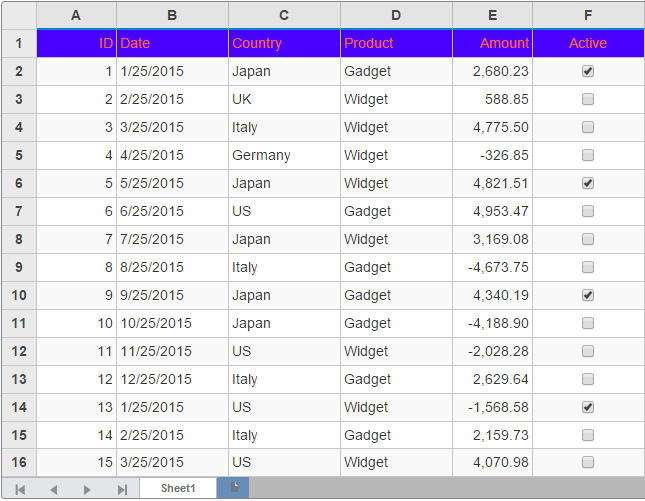
The following code examples demonstrate how to bind FlexSheet to fetch data from remote data source:
Add a Sale.cs class to the Models folder.
DOC-DETAILS-TAG-OPEN
DOC-SUMMARY-TAG-OPEN
Model
DOC-SUMMARY-TAG-CLOSE
```csharp
public class Sale
{
public int ID { get; set; }
public DateTime Date { get; set; }
public string Country { get; set; }
public string Product { get; set; }
public double Amount { get; set; }
public bool Active { get; set; }
private static List COUNTRIES = new List { "US", "Germany", "UK", "Japan", "Italy", "Greece" };
private static List PRODUCTS = new List { "Widget", "Gadget", "Doohickey" };
///
DOC-SUMMARY-TAG-OPEN
/// Get the data.
///
DOC-SUMMARY-TAG-CLOSE
///
///
public static IEnumerable GetData(int total)
{
var rand = new Random(0);
var list = Enumerable.Range(0, total).Select(i =>
{
var country = COUNTRIES[rand.Next(0, COUNTRIES.Count - 1)];
var product = PRODUCTS[rand.Next(0, PRODUCTS.Count - 1)];
var date = new DateTime(2015, i % 12 + 1, 25);
return new Sale
{
ID = i + 1,
Date = date,
Country = country,
Product = product,
Amount = Math.Round(rand.NextDouble() * 10000 - 5000, 2),
Active = (i % 4 == 0)
};
});
return list;
}
public static List GetCountries()
{
var countries = new List();
countries.AddRange(COUNTRIES);
return countries;
}
public static List GetProducts()
{
List products = new List();
products.AddRange(PRODUCTS);
return products;
}
}
```
DOC-DETAILS-TAG-CLOSE
**DataBindingController.cs**
```csharp
public class DataBindingController : Controller
{
public static List SALES = Sale.GetData(50).ToList();
public ActionResult RemoteBind([C1JsonRequest] CollectionViewRequest requestData)
{
return this.C1Json(CollectionViewHelper.Read(requestData, Sale.GetData(50)));
}
public ActionResult Index()
{
return View(SALES);
}
}
```
**DataBinding.cshtml**
```razor
@using MVCFlexSheet.Models;
@model IEnumerable
```
### Local Model Binding in FlexSheet
Data Binding in FlexSheet can also be accomplished by passing a model locally in Bind property, unlike remote binding where a URL is passed.
The following code examples demonstrate how to bind FlexSheet control to fetch data from local data source:
#### In Code
Create a Sale.cs model class in the Models folder, as discussed [above](/componentone/docs/mvc/online-mvc/workwithcontrols/FlexSheet/workwithflexsheet/DataBinding#SaleModel).
**ModelBindingController.cs**
```csharp
public partial class ModelBindController : Controller
{
// GET: ModelBind
public static List SALES = Sale.GetData(15).ToList();
public ActionResult ModelDBIndex()
{
return View(SALES);
}
}
```
**ModelBinding.cshtml**
```razor
@model IEnumerable