# Merging Cells Programmatically
Develop powerful and lightweight web applications using ASP.NET MVC controls. Learn more about the ComponentOne MVC controls in ASP.NET MVC documentation.
## Content
FlexSheet allows you to carry out merging of cells in FlexSheet control through code. This can be achieved by specifying the [CellRange](/componentone/api/mvc/online-mvc/dotnet-framework-api/C1.Web.Mvc.FlexSheet/C1.Web.Mvc.Sheet.Range.html) to merge in **mergeRange()** method. This section demonstrates this by extending the scenario in [Merging Cells at Run-time](/componentone/docs/mvc/online-mvc/workwithcontrols/FlexSheet/workwithflexsheet/CellMerging/MergingCellsatRun-time).
Here, we use CellRange to specify the group of adjacent cells which are to be merged, by stating the index of first row, first column, last row, and last column in the range.
Note that the FlexSheet, in the below example, shows data from a workbook file which is loaded from server.
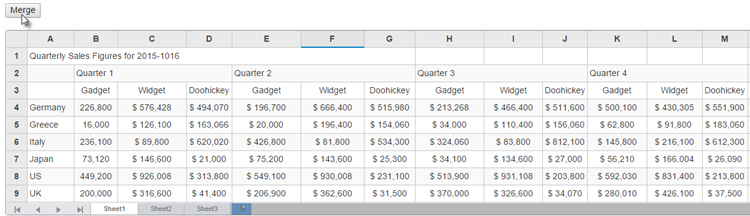
The following code examples demonstrate how to enable Cell Merging in the FlexSheet control through code:
#### In Code
**MergeController.cs**
```csharp
public class CellMergeController : Controller
{
// GET: CellMerge
public ActionResult CodeMrgeIndex()
{
return View();
}
}
```
** Merging.cshtml**
```razor
```
## See Also
**Reference**
[Range Class](/componentone/api/mvc/online-mvc/dotnet-framework-api/C1.Web.Mvc.FlexSheet/C1.Web.Mvc.Sheet.Range.html)
[FlexSheet Class](/componentone/api/mvc/online-mvc/dotnet-framework-api/C1.Web.Mvc.FlexSheet/C1.Web.Mvc.Sheet.FlexSheet.html)