# Using CollectionView Service
Develop powerful and lightweight web applications using ASP.NET MVC controls. Learn more about the ComponentOne MVC controls in ASP.NET MVC documentation.
## Content
FlexGrid for MVC does not support unbound mode, however you can achieve this by adding code on the client side to set the data using JavaScript or TypeScript.
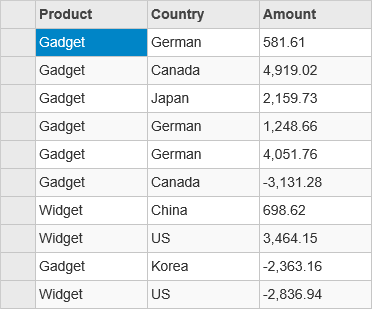
To achieve this we will be using **CollectionViewService** which binds to the model. At client side we get a reference of the CollectionViewService and add rows to the FlexGrid as per the number of items in the **Sale.cs** model. Finally we get the data of the three columns and add to FlexGrid using **setCellData** method.
The following image shows how you can set the data from the client side using CollectionViewService. The example uses Sale.cs model added in the [QuickStart](/componentone/docs/mvc/online-mvc/workwithcontrols/FlexGrid/FlexGridQuickStart) section.
The following code example demonstrates how to set the data by adding code to the client side.
**JavaScript File (App.js)**
```APP.javascript
var fg;
c1.documentReady(function () {
populate();
})
function populate() {
var fg = wijmo.Control.getControl("#fg");
var cv = c1.getService('cv');
var total = cv.items.length;
for (var i = 0; i <= total - 1; i++) {
var obj = [cv.items[i].Product, cv.items[i].Country, cv.items[i].Amount];
var row = new wijmo.grid.Row();
fg.rows.push(row);
for (var c = 0; c <= fg.columns.length - 1; c++) {
fg.setCellData(i, c, obj[c]);
}
}
}
```
**Controller Code**
```csharp
public ActionResult Index()
{
return View(Sale.GetData(15));
}
```
**View Code**
```razor
@model IEnumerable
@(Html.C1().CollectionViewService().Id("cv").Bind(Model))
@(Html.C1().FlexGrid().Id("fg").Height(400).AutoGenerateColumns(false).AllowAddNew(false)
.SelectionMode(C1.Web.Mvc.Grid.SelectionMode.Cell)
.Columns( col => {
col.Add(cb => cb.Name("Product").Header("Product"));
col.Add(cb => cb.Name("Country").Header("Country"));
col.Add(cb => cb.Name("Amount").Header("Amount"));
}))
```
## See Also
**Reference**
[FlexGridBase\ Class](/componentone/api/mvc/online-mvc/dotnet-framework-api/C1.Web.Mvc/C1.Web.Mvc.FlexGridBase-1.html)