# Column Footer Panel
Develop powerful and lightweight web applications using ASP.NET MVC controls. Learn more about the ComponentOne MVC controls in ASP.NET MVC documentation.
## Content
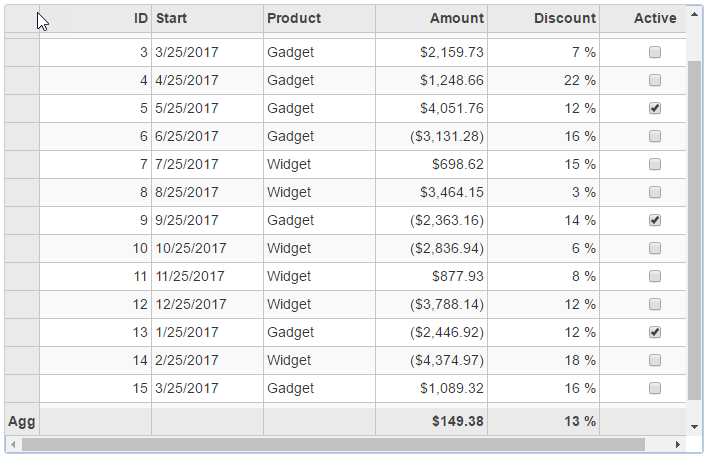
FlexGrid provides support for column footers which allows you to show the group row to display the aggregate data. You can calculate the aggregate data and display the result in the column footer panel. To show the column footer panel in the FlexGrid, the [ShowColumnFooters](/componentone/api/mvc/online-mvc/dotnet-framework-api/C1.Web.Mvc/C1.Web.Mvc.FlexGridBase-1.ShowColumnFooters.html) property should be set to **true**. You can also set the row header text of the group row; if not set, it will use the default value, a sigma character (Σ).
The ShowColumnFooter property shows the aggregate value for all the values for the current column:
1. When DisableServerRead is **true**, it fetches all the row data and calculate the aggregate for all the rows.
2. When DisableServerRead is **false** and InitialItemsCount is set, the grid using virtual scrolling and not all rows data are sent to client. Therefore, the aggregate value maybe incorrect, since it is only for partial rows.
The following image shows how the FlexGrid appears after setting the ShowColumnFooters property. The example uses Sale.cs model added in the [QuickStart](/componentone/docs/mvc/online-mvc/workwithcontrols/FlexGrid/FlexGridQuickStart) topic.
```razor
@using .Models
@using C1.Web.Mvc.Grid
@model IEnumerable
@(Html.C1().FlexGrid()
.AutoGenerateColumns(false)
.Height(450)
.Width(700)
.AllowAddNew(true)
.SelectionMode(C1.Web.Mvc.Grid.SelectionMode.Cell)
.CssClass("grid")
.ShowColumnFooters(true, "Agg")
.Bind(Model)
.Columns(bl =>
{
bl.Add(cb => cb.Binding("ID"));
bl.Add(cb => cb.Binding("Start"));
bl.Add(cb => cb.Binding("Product"));
bl.Add(cb => cb.Binding("Amount").Format("c").Aggregate(Aggregate.Sum));
bl.Add(cb => cb.Binding("Discount").Format("p0").Aggregate(Aggregate.Avg));
bl.Add(cb => cb.Binding("Active"));
})
)
```
## See Also
[Quick Start](/componentone/docs/mvc/online-mvc/workwithcontrols/FlexGrid/FlexGridQuickStart)
**Reference**
[ShowColumnFooters Property](/componentone/api/mvc/online-mvc/dotnet-framework-api/C1.Web.Mvc/C1.Web.Mvc.FlexGridBase-1.ShowColumnFooters.html)
[FlexGridBase\ Class](/componentone/api/mvc/online-mvc/dotnet-framework-api/C1.Web.Mvc/C1.Web.Mvc.FlexGridBase-1.html)