# Unobtrusive Validation
Develop powerful and lightweight web applications using ASP.NET MVC controls. Learn more about the ComponentOne MVC controls in ASP.NET MVC documentation.
## Content
Unobtrusive validation support for FlexGrid helps you to validate the data that you enter in the FlexGrid at client side. Unobtrusive Validation can implement simple client-side validation without writing a bulk of validation code, and improves the user experience simply by adding the right attributes and including the script files.
In a common validation scenario, when we use a validation to validate any control and use client side validation, JavaScript code is generated and rendered as HTML on the web browser. However, with unobtrusive validation inline javascript is not generated for rendering to handle client side validation. Instead, it uses HTML5 data-\* attributes for client side validations. Unobtrusive validation support is jQuery dependent.
Before implementing the below steps, you need to create a new MVC application using [ComponentOne template](/componentone/docs/mvc/online-mvc/CreatingaNewProject/UsingC1Template) or [Visual Studio template](/componentone/docs/mvc/online-mvc/CreatingaNewProject/UsingVSTemplate).
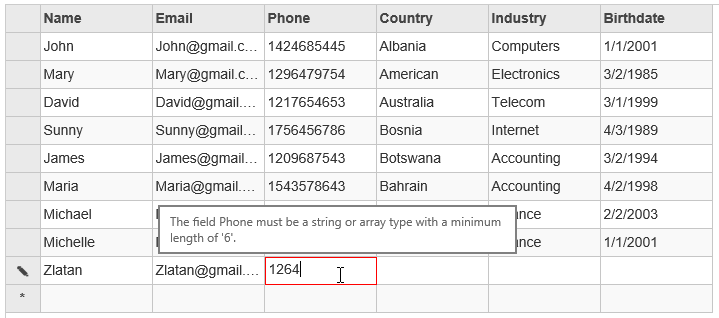
### Configure your MVC application
Complete the following steps to add the js file references to your application.
1. From the **Solution Explorer**, open the folders **Views | Shared**.
2. Double click **\_Layout.cshtml** to open it.
3. Add the following code between the \\ tags.
```razor
```
### Create Validations and Datasource for FlexGrid
**Model - UserInfo.cs (Includes Validations)**
```razor
using System.ComponentModel.DataAnnotations;
namespace UnobtrusiveValidation.Models
{
public class UserInfo
{
public UserInfo() {
Birthdate = DateTime.Now;
}
[Required]
[RegularExpression(pattern: "^[a-zA-Z0-9]{4,10}$", ErrorMessage = "The username must be alphanumeric and contains 4 to 10 characters.")]
public string Name { get; set; }
[Required]
[RegularExpression(pattern: @"^\w+([-+.]\w+)*@\w+([-.]\w+)*\.\w+([-.]\w+)*$", ErrorMessageResourceType = typeof(Resources.Validation), ErrorMessageResourceName = "Register_Email_ErrorMessage")]
[EmailAddress]
public string Email { get; set; }
[Required]
[MinLength(6)]
[MaxLength(16)]
public string Phone { get; set; }
[Required]
public string Country { get; set; }
[Required]
public string Industry { get; set; }
[Required]
public DateTime Birthdate { get; set; }
}
}
```
**Model - UserData.cs (Includes Data)**
```razor
public class UserData
{
public static List Users
{
get
{
return new List()
{
new UserInfo(){ Name="John", Email="John@gmail.com", Phone="1424685445", Country="Albania", Industry="Computers", Birthdate= DateTime.Parse("2001/1/1")},
new UserInfo(){ Name="Mary", Email="Mary@gmail.com", Phone="1296479754", Country="American", Industry="Electronics", Birthdate= DateTime.Parse("1985/3/2")},
new UserInfo(){ Name="David", Email="David@gmail.com", Phone="1217654653", Country="Australia", Industry="Telecom", Birthdate= DateTime.Parse("1999/3/1")},
new UserInfo(){ Name="Sunny", Email="Sunny@gmail.com", Phone="1756456786", Country="Bosnia", Industry="Internet", Birthdate= DateTime.Parse("1989/4/3")},
new UserInfo(){ Name="James", Email="James@gmail.com", Phone="1209687543", Country="Botswana", Industry="Accounting", Birthdate= DateTime.Parse("1994/3/2")},
new UserInfo(){ Name="Maria", Email="Maria@gmail.com", Phone="1543578643", Country="Bahrain", Industry="Accounting", Birthdate= DateTime.Parse("1998/4/2")},
new UserInfo(){ Name="Michael", Email="Michael@gmail.com", Phone="1215457467", Country="Argentina", Industry="Finance", Birthdate= DateTime.Parse("2003/2/2")},
new UserInfo(){ Name="Michelle", Email="Michelle@gmail.com", Phone="1534357546", Country="Bulgaria", Industry="Finance", Birthdate= DateTime.Parse("2001/1/1")}
};
}
}
}
```
### Add a FlexGrid control
**UnobtrusiveValidationController.cs**
```razor
public class IndexController : Controller
{
private static List users = UserData.Users;
public IActionResult Index()
{
return View(users);
}
}
```
**View - Index.cshtml**
```razor
@using FlexGridValidationsHTMLHelpers.Models;
@model List
@section Scripts{
@Scripts.Render("~/jquery")
@Scripts.Render("~/jqueryval")
}
@(Html.C1().FlexGrid()
.Id("flexGrid")
.AutoGenerateColumns(false)
.Columns(columns => columns
.Add(c => c.Binding("Name"))
.Add(c => c.Binding("Email"))
.Add(c => c.Binding("Phone"))
.Add(c => c.Binding("Country"))
.Add(c => c.Binding("Industry"))
.Add(c => c.Binding("Birthdate").Format("M/d/yyyy"))
)
.Bind(ib => ib.Bind(Model))
.AllowAddNew(true)
.AllowDelete(true)
.CssStyle("height", "400px")
```
### Build and Run the Project
1. Click **Build | Build Solution** to build the project.
2. Press **F5** to run the project.
### Limitations
* FlexGrid unobtrusive validation does not support Boolean data in check box cell because when you click it, it will end the editing directly.
* FlexGrid unobtrusive validation does not support bind to read action URL because cannot get model meta data from read action.
* FlexGrid unobtrusive validation does not support datamap column because can not get the actual value when editing.
* FlexGrid unobtrusive validation does not support cell template because the "onPrepareCellForEdit" not triggered.
## See Also
**Reference**
[FlexGridBase\ Class](/componentone/api/mvc/online-mvc/dotnet-framework-api/C1.Web.Mvc/C1.Web.Mvc.FlexGridBase-1.html)
[FlexGrid\ Class](/componentone/api/mvc/online-mvc/dotnet-framework-api/C1.Web.Mvc/C1.Web.Mvc.FlexGrid-1.html)