# Reading
Display records from the database using server-side operation supported by the ComponentOne CollectionView. Learn more about it in ASP.NET MVC documentation.
## Content
The server side [CollectionViewHelper](/componentone/api/mvc/online-mvc/dotnet-framework-api/C1.Web.Mvc/C1.Web.Mvc.CollectionViewHelper.html) class defines a **Read** request to retrieve data. This enables displaying of records from the source database by handling **Read** request of [CollectionViewHelper](/componentone/api/mvc/online-mvc/dotnet-framework-api/C1.Web.Mvc/C1.Web.Mvc.CollectionViewHelper.html).
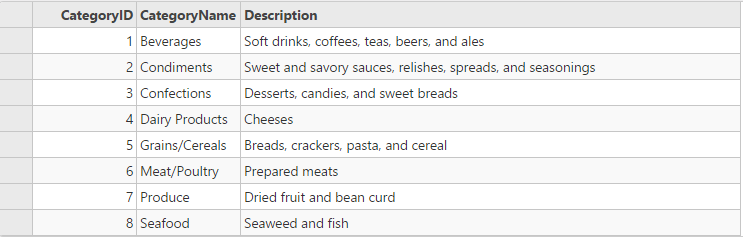
The following image shows how the FlexGrid appears after the **Read** request is defined.
The example uses C1NWind data source, which was configured in the application in the [Quick Start](/componentone/docs/mvc/online-mvc/workwithcontrols/CollectionView/CollectionViewQuickStart):
The following code example demonstrates how to use **Read** request of [CollectionViewHelper](/componentone/api/mvc/online-mvc/dotnet-framework-api/C1.Web.Mvc/C1.Web.Mvc.CollectionViewHelper.html) to display records from the datasource in the FlexGrid:
#### In Code
**ReadController.cs**
```csharp
//Define datasource for FlexGrid
private C1NWindEntities db = new C1NWindEntities();
public ActionResult Index()
{
return View();
}
//Instantiate a JSON request
public ActionResult GridReadCategory([C1JsonRequest] CollectionViewRequest requestData)
{
return this.C1Json(CollectionViewHelper.Read(requestData, db.Categories));
}
```
In this example, the **GridReadCategory** action of controller is assigned to Bind property of FlexGrid's [ItemSource](/componentone/api/mvc/online-mvc/dotnet-framework-api/C1.Web.Mvc/C1.Web.Mvc.IItemsSource-1.html) to populate data.
**Read.cshtml**
```razor
@(Html.C1().FlexGrid().Id("fGRCView").AutoGenerateColumns(false).IsReadOnly(true)
.CssClass("grid")
.Columns(columns => columns
.Add(c => c.Binding("CategoryID"))
.Add(c => c.Binding("CategoryName"))
.Add(c => c.Binding("Description").Width("500")))
.Bind(
ib => ib.Bind(Url.Action("GridReadCategory"))
)
)
```