# Tracking Changes
CollectionView supports client-side operations in MVC. Learn more tracking changes madeto data using ComponentOne CollectionView in MVC documentation.
## Content
The **CollectionView** class can keep track of changes made to the data. It is useful in situations where you must submit changes to the server. To turn on change tracking, set the **TrackChanges** property to true. Once you do that, the **CollectionView** starts tracking the changes made to the data and exposes them using the following:
* **ItemsEdited**: This list contains items that are edited using the **BeginEdit** and **CommitEdit** methods.
* **ItemsAdded**: This list contains items that are added using the **AddNew** and **CommitNew** methods.
* **ItemsRemoved**: This list contains items that are removed using the **Remove** method.
> type=note
> Make sure that the **DisableServerRead** property of [ItemSource](/componentone/api/mvc/online-mvc/dotnet-framework-api/C1.Web.Mvc/C1.Web.Mvc.IItemsSource-1.html) is set to **True** if filtering, paging, sorting is to be performed on data available at client side only.
The example uses **C1NWind** data source, for which the configuration in the [Quick Start](/componentone/docs/mvc/online-mvc/workwithcontrols/CollectionView/CollectionViewQuickStart) application. The following image shows how the FlexGrid appears after the **TrackChanges** property is set to **true**.
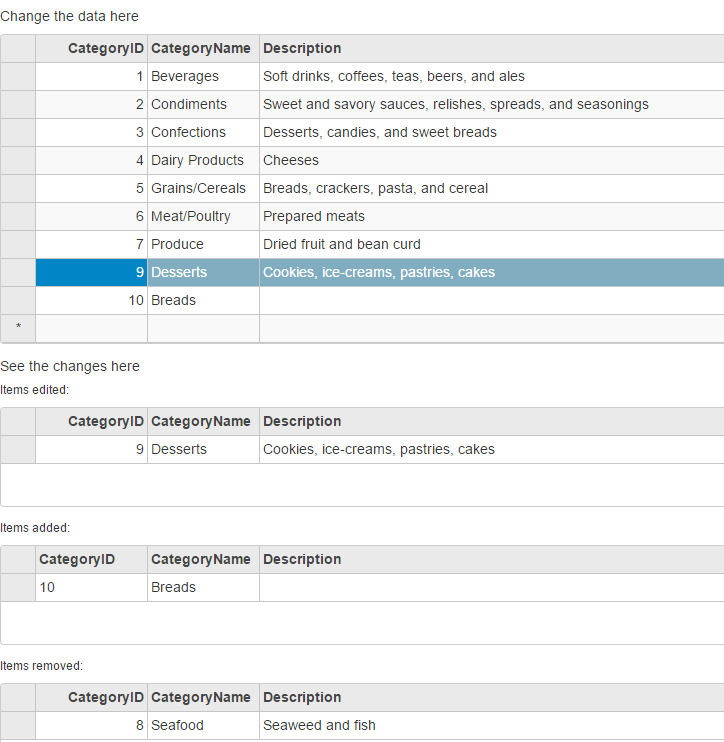
The following code example demonstrates how to initialize a FlexGrid, and keep a track of changes by using **TrackChanges** property of the CollectionView.
**TrackChangesController.cs**
```csharp
private C1NWindEntities db = new C1NWindEntities();
public ActionResult Index()
{
return View(db);
}
```
**TrackChanges.cshtml**
### ASP.NET
```razor
Change the data here
@(Html.C1().FlexGrid().Id("tcMainGrid").AutoGenerateColumns(false)
.AllowAddNew(true).AllowDelete(true)
.Columns(columns => columns
.Add(c => c.Binding("CategoryID"))
.Add(c => c.Binding("CategoryName"))
.Add(c => c.Binding("Description").Width("*")))
.Bind(ib =>
ib.Bind(Model.Categories).DisableServerRead(true)
)
)
See the changes here
Items edited:
@(Html.C1().FlexGrid().Id("tcEditedGrid").AutoGenerateColumns(false)
.IsReadOnly(true).Height(100)
.Columns(columns => columns
.Add(c => c.Binding("CategoryID").IsReadOnly(true))
.Add(c => c.Binding("CategoryName"))
.Add(c => c.Binding("Description").Width("*")))
)
Items added:
@(Html.C1().FlexGrid().Id("tcAddedGrid").AutoGenerateColumns(false)
.IsReadOnly(true).Height(100)
.Columns(columns => columns
.Add(c => c.Binding("CategoryID").IsReadOnly(true))
.Add(c => c.Binding("CategoryName"))
.Add(c => c.Binding("Description").Width("*")))
)
Items removed:
@(Html.C1().FlexGrid().Id("tcRemovedGrid").AutoGenerateColumns(false)
.IsReadOnly(true).Height(100)
.Columns(columns => columns
.Add(c => c.Binding("CategoryID").IsReadOnly(true))
.Add(c => c.Binding("CategoryName"))
.Add(c => c.Binding("Description").Width("*")))
)
```
### JS
```javascript
```