# Current Record Management

Learn about the current record management using ComponentOne MVC CollectionView control in ASP.NET MVC documentation.

## Content


CollectionView can manage the current record by using the **ICollectionView** interface.

To obtain the current position of a record in the collection, use **currentPosition** property. We also use the methods **moveCurrentTo(item), moveCurrentToFirst(), moveCurrentToLast(), moveCurrentToNext(), moveCurrentToPosition(index) and moveCurrentToPrevious()** to change the current position. When the current is changed, we use the events **currentChanging** and **currentChanged** to track it. We can cancel the current changing in the event **currentChanging**.


> type=note
> Make sure that the [DisableServerRead](/componentone/api/mvc/online-mvc/dotnet-framework-api/C1.Web.Mvc/C1.Web.Mvc.IItemsSource-1.DisableServerRead.html) property of [ItemSource](/componentone/api/mvc/online-mvc/dotnet-framework-api/C1.Web.Mvc/C1.Web.Mvc.IItemsSource-1.html) is set to **True** if filtering, paging, sorting is to be performed on data available at client side only.

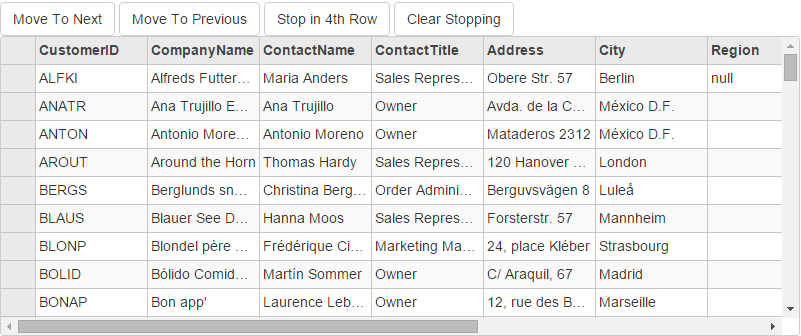
The example uses C1NWind data source, which was configured in the application in the [Quick Start](/componentone/docs/mvc/online-mvc/workwithcontrols/CollectionView/CollectionViewQuickStart):<br />

![Record management in FlexGrid](https://cdn.mescius.io/document-site-files/images/2b3ac322-100e-4637-958d-fb40dcda3f44/images/collectionviewcurrencyrecord.png)

The following code example demonstrates how to manage current records in FlexGrid through CollectionView.

#### In Code

**CurrentRecordManagementController.cs**

```csharp
private C1NWindEntities db = new C1NWindEntities();
public ActionResult Index()
{
    return View(db);
}
```

**CurrentRecordManagement.cshtml**

### ASP.NET

```razor
<div>
    <button class="btn btn-default" id="btnCRMMoveNext">Move To Next</button>
    <button class="btn btn-default" id="btnCRMMovePre">Move To Previous</button>
    <button class="btn btn-default" id="btnCRMStop4">Stop in 4th Row</button>
    <button class="btn btn-default" id="btnCRMReset">Clear Stopping</button>
</div>
@(Html.C1().FlexGrid().Id("crmGrid").IsReadOnly(true).SelectionMode(C1.Web.Mvc.Grid.SelectionMode.Row)
.Height(300).Width(800).AutoGenerateColumns(true).Bind(b => b.DisableServerRead(true).Bind(Model.Customers))
)
```

### JS

```javascript
<script>
    $(document).ready(function () {
        //Current Record Management
        crmGrid = wijmo.Control.getControl('#crmGrid');
        cvCRM = crmGrid.itemsSource; //new wijmo.collections.CollectionView(getData(10)),

        // Add the processes for buttons' click
        // Move to the Next item
        document.getElementById('btnCRMMoveNext').addEventListener('click', function () {
            cvCRM.moveCurrentToNext();
        });
        // Move to the previous item
        document.getElementById('btnCRMMovePre').addEventListener('click', function () {
            cvCRM.moveCurrentToPrevious();
        });
        // When the current item is the 4th one, restrict any change
        document.getElementById('btnCRMStop4').addEventListener('click', function () {
            cvCRM.currentChanging.addHandler(stopCurrentIn4th);
        });
        // Restore to be able to change
        document.getElementById('btnCRMReset').addEventListener('click', function () {
            cvCRM.currentChanging.removeHandler(stopCurrentIn4th);
        });
        // define the function to forbid the current moving.
        function stopCurrentIn4th(sender, e) {
            // when the current is the 4rd item, stop moving.
            if (sender.currentPosition === 3) {
                e.cancel = true;
            }
        };
    });
    // create collectionview, grid
    var crmGrid = null
        , cvCRM = null;
</script>
```