# Node Navigation
## Content
The simplest and most common use for the TreeView control is navigation. The TreeView's hierarchical structure and auto-search functionality makes it easy for users to drill-down and find the items they are interested in. TreeView supports both mouse and keyboard navigation of nodes.
You can use the [OnClientSelectedItemChanged](/componentone/api/mvc/online-mvc-core/dotnet-api/C1.AspNetCore.Mvc/C1.Web.Mvc.TreeView.OnClientSelectedItemChanged.html) or [OnClientItemClicked](/componentone/api/mvc/online-mvc-core/dotnet-api/C1.AspNetCore.Mvc/C1.Web.Mvc.TreeView.OnClientItemClicked.html) events for navigation in the TreeView control. The difference is that **OnClientSelectedItemChanged** occurs when user moves the selection with keyboard, and **OnClientItemClicked** occurs when user clicks an item or presses the Enter key.
This example uses the OnClientItemClicked event for navigation. The below example code uses **Property** model added in the [QuickStart](/componentone/docs/mvc/online-mvc-core/WorkingwithControls/TreeView/TreeViewQuickStart) section.
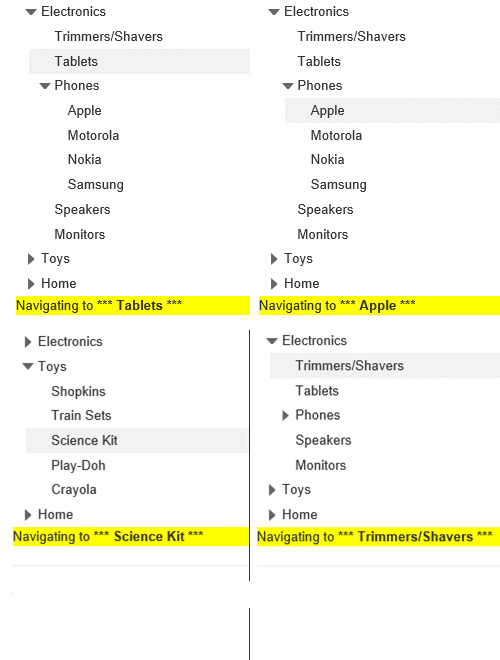
**NavigationController.cs**
```csharp
public class TreeViewController : Controller
{
// GET: TreeView
public ActionResult Index()
{
return View(Property.GetData(Url));
}
}
```
**Navigation.cshtml**
```html
@using
@model Property[]
```
### Mouse Navigation
The following table lists the actions and the corresponding Mouse commands for navigating nodes in TreeView:
| **Action** | **Mouse Command** |
| --- | --- |
| Expand a node | Click on the plus sign on the left side of the node's name. |
| Collapse a node | Click on the minus sign on the left side of the node's name. |
| Select a node | Click on the node's name. |
### Keyboard Navigation
The following table describes the actions and their associated keys to use when navigating nodes in TreeView:
| **Action** | **Keyboard Command** |
| --- | --- |
| Move up a node | Up Arrow Key |
| Move down a node | Down Arrow Key |
| Distributed selection | MOUSE + CTRL |
| Continuous selection | MOUSE + SHIFT |