# Remote Binding
## Content
The TreeView control allows you to retrieve data directly using **JSONResult** object. This specifies remote data URLs, which include the server, table and columns. The arrays returned are used as data sources for C1CollectionView objects. In tag helpers, [LoadActionURL](/componentone/api/mvc/online-mvc-core/dotnet-api/C1.AspNetCore.Mvc/C1.Web.Mvc.TreeView.LoadActionUrl.html) property in TreeView is used to bind it to a collection by passing an action URL method to carry out a specific operation. Similarly, in HTML helpers, **Bind** property is used to bind to a collection.
This topic demonstrates how to retrieve data from an existing data source remotely. This is useful for developing data-intensive applications and scenarios for representing data as dashboards.
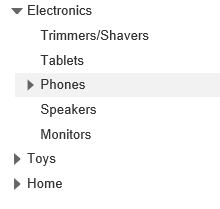
The below example code uses **Property** model added in the [QuickStart](/componentone/docs/mvc/online-mvc-core/WorkingwithControls/TreeView/TreeViewQuickStart) section. The following image shows how the TreeView control is displayed after making the C1JSON Request to fetch data from the model.
#### In Code
**RemoteBindController.cs**
```csharp
public class TreeViewController : Controller
{
// GET: TreeView
public ActionResult Index()
{
return View();
}
public ActionResult RemoteLoading_LoadAction()
{
return Json(Property.GetData(url));
}
}
```
**RemoteBind.cshtml**
```html
```