# Custom Node

## Content


The TreeView control allows you to display custom content in nodes. You can customize the content of the TreeView nodes using the **formatItem** event. The event handler's parameters include the element that represents the node and the data item being rendered.

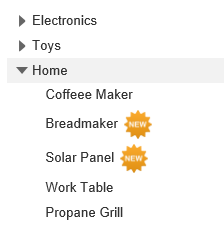
The example uses the [OnClientFormatItem](/componentone/api/mvc/online-mvc-core/dotnet-api/C1.AspNetCore.Mvc/C1.Web.Mvc.TreeView.OnClientFormatItem.html) event to add a "new" badge to the right of new items on the treeview. The below example code uses **Property** model added in the [QuickStart](/componentone/docs/mvc/online-mvc-core/WorkingwithControls/TreeView/TreeViewQuickStart) section.<br /><br />![](https://cdn.mescius.io/document-site-files/images/9b6a6cfe-b8e8-42e9-8a04-da6cb7762977/images/customnode.png)

In the code example below, we subscribe the **OnClientFormatItem** method by assigning the JavaScript function name in the razor code. In the **\<Script>** section, we declare the formatItem function to check, if the dataItem is a new item in the list, then it will add a custom image beside the new nodes. The image is stored inside the **Content** folder of your MVC application.

In the code example below, **OnClientFormatItem()** method raises the [formatItem](wijmo.nav.TreeView.Class.html#formatitem) event. In the **formatItem(treeview, args)** function, **treeview** is the sender, and **args** is a type of [FormatNodeEventArgs](wijmo.nav.FormatNodeEventArgs.Class.html) class.

**CustomNode.cshtml**

```html
@using <ApplicationName.Models>
@model Property[]
<script type="text/javascript">
    function formatItem(treeview, args) {
        if (args.dataItem.NewItem) {
            args.element.innerHTML +=
                '<img style="margin-left:6px" src="@Href("~/Content/new.png")"/>';
            }
        }
</script>
<c1-tree-view display-member-path="Header" child-items-path="Items"
    source="Model" format-item="formatItem"></c1-tree-view>
```