# Predefined Ranges

## Content


InputDateRange lets you to predefine date ranges based on your requirements. Using the InputDateRange control, you can define various date ranges, such as current week, last week, next month, this year range, custom ranges, etc., in your applications for users to choose from. You can use the **PredefinedRanges** property to define the day, week, month, year, or custom ranges in the InputDateRange control.

Note that this property works when the **SelectionMode** property is set to **DateSelectionMode.Range**.
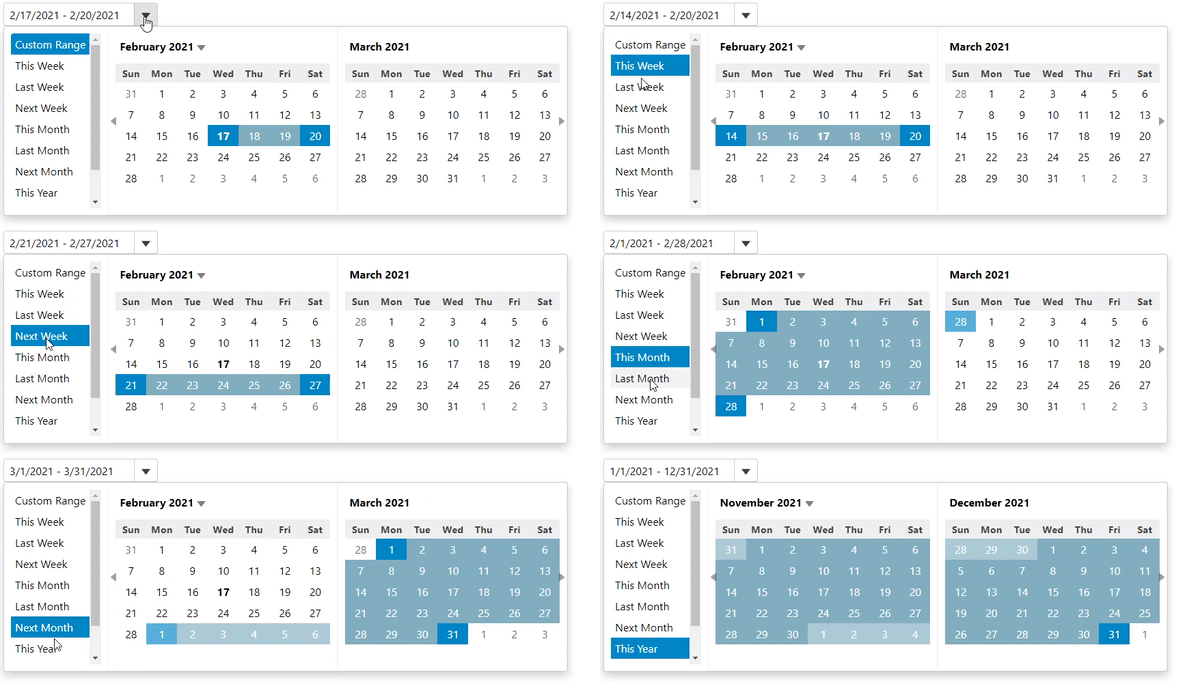
![](https://cdn.mescius.io/document-site-files/images/9b6a6cfe-b8e8-42e9-8a04-da6cb7762977/images/daterange-predefinedrange.gif)

The following code snippets showcases how you can define different week, month, year or custom ranges using the **PredefinedRanges** property.

```razor
@{
    var today = DateTime.Now.Date;
    var rangeEnd = today.AddDays(3);
}
    <script>
        // Get predefined date ranges
        function getPredefinedRanges() {
            let dt = wijmo.DateTime, now = new Date();
            return {
                // Custom
                'Custom Range': null,
                // Weeks
                'This Week': [dt.weekFirst(now), dt.weekLast(now)],
                'Last Week': [dt.weekFirst(dt.addDays(now, -7)), dt.weekLast(dt.addDays(now, -7))],
                'Next Week': [dt.weekFirst(dt.addDays(now, +7)), dt.weekLast(dt.addDays(now, +7))],
                // Months
                'This Month': [dt.monthFirst(now), dt.monthLast(now)],
                'Last Month': [dt.monthFirst(dt.addMonths(now, -1)), dt.monthLast(dt.addMonths(now, -1))],
                'Next Month': [dt.monthFirst(dt.addMonths(now, +1)), dt.monthLast(dt.addMonths(now, +1))],
                // Years
                'This Year': [dt.yearFirst(now), dt.yearLast(now)],
                'Last Year': [dt.addYears(dt.yearFirst(now), -1), dt.addYears(dt.yearLast(now), -1)],
                'Next Year': [dt.addYears(dt.yearFirst(now), +1), dt.addYears(dt.yearLast(now), +1)],
            };
        }
        </script>
<c1-input-date-range id="demoControl" close-on-selection="false" selection-mode="Range" predefined-ranges="getPredefinedRanges" month-count="2" value="@today" range-end="@rangeEnd">
</c1-input-date-range>
```