# Input Mask Types

## Content


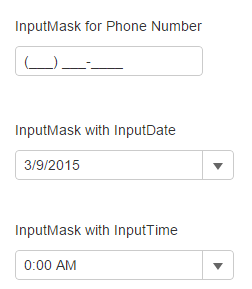
You can use InputMask control for verifying different types of data using the Mask property. For example, you can add a mask that prefixes telephone number with three-digit area code. You can also use the control with InputDate and InputTime, which prevents user to enter invalid data accidentally.

The following images show how the **InputMask** control appears after applying different masks to it.
![](https://cdn.mescius.io/document-site-files/images/9b6a6cfe-b8e8-42e9-8a04-da6cb7762977/images/inputmaskfeature.png)

The following code examples demonstrate how to bind Menu to an InputNumber control:

**InputMaskController.cs**

```razor
public ActionResult Feature()
{
    return View();
}
```

**InputMask.cshtml**

```html
<div>
    <label>Input Mask for Phone Number</label>
    <c1-input-mask mask="(999) 000-0000" title="Mask: (999) 000-0000"></c1-input-mask>
</div>
<div>
    <label>InputMask with InputDate</label>
    <c1-input-date value="@DateTime.Now" format="d" mask="99/99/9999" title="Mask: 99/99/9999"></c1-input-date>
</div>
<div>
    <label>InputMask with InputTime</label>
    <c1-input-time value="@DateTime.Now" format="t" mask="00:00 >LL" step="@(new TimeSpan(0, 15, 0).TotalMinutes)" is-editable=true title="Mask: 00:00 >LL"></c1-input-time>
</div>
```