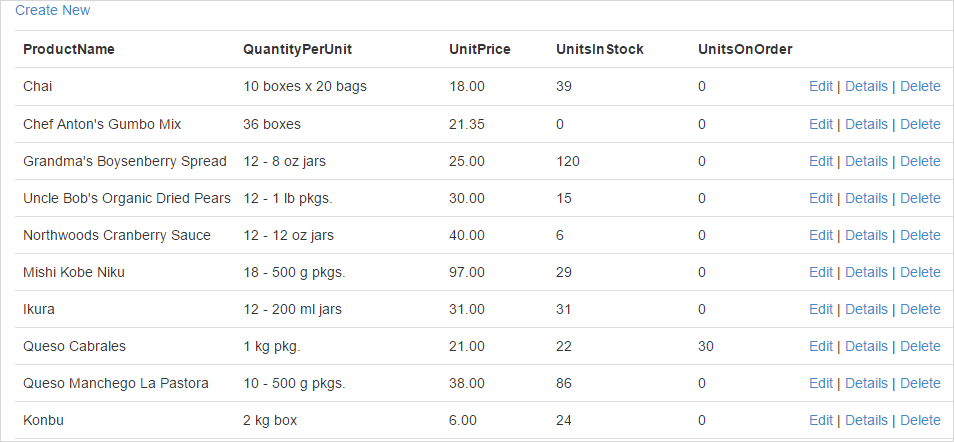
# Scaffolding

## Content

The steps to scaffold **ComponentOne Input** control for ASP.NET MVC are as follows:

1. Configure the datasource.
2. In the Solution Explorer, right-click the project name and select **Add\|New Scaffolded Item**. The **Add Scaffold** wizard appears.
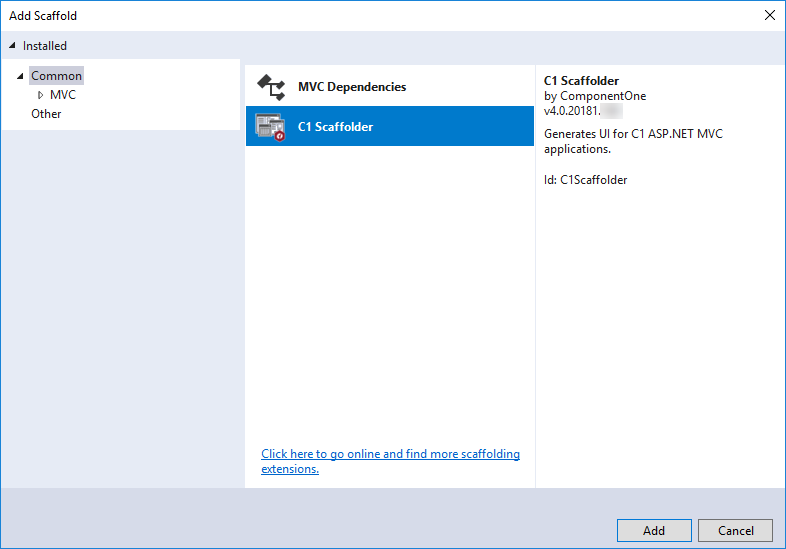
3. In the Add Scaffold wizard, select **Common** and then select **C1 Scaffolder** from the right pane. You can also select **Common\|MVC\|Controller** or **Common\|MVC\|View** and then **C1 Scaffolder** to add only a controller or a view.
<br>
    ![C1Web Input Controls - Adding Scaffold ](https://cdn.mescius.io/document-site-files/images/9b6a6cfe-b8e8-42e9-8a04-da6cb7762977/images/scaffold_addscaffold.png)
4. Click **Add**.
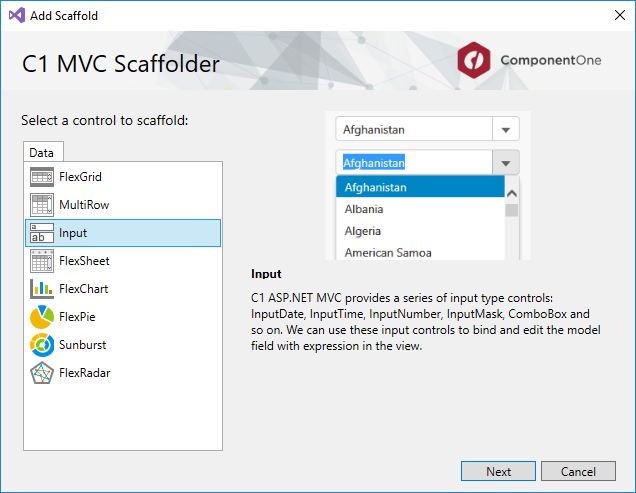
5. Select **Input** control and click **Next**.
<br>
    ![C1Web Input Controls - Adding Scaffold Menu UI](https://cdn.mescius.io/document-site-files/images/9b6a6cfe-b8e8-42e9-8a04-da6cb7762977/images/scaffold_addscaffold_input.png)
    The **C1 ASP.NET MVC Input** wizard appears with the General tab selected by default.
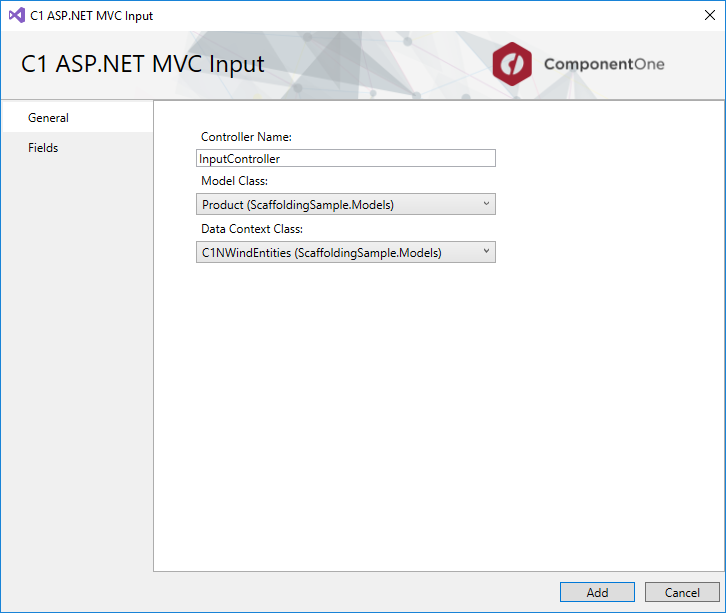
6. In the **General** tab, specify the model as follows:
    1. Type the **Controller Name** and **View Name**.
    2. Select **Model Class** from the drop-down list. The list shows all the available model types in the application in addition to the C1NWind.edmx model added in Step 1. In our case, we select Product to populate products in the Input control.
    3. Select **Data Context Class** from the drop-down list. In our case, we select C1NWindEntities.
        ![C1Web Input Controls - Menu General UI](https://cdn.mescius.io/document-site-files/images/9b6a6cfe-b8e8-42e9-8a04-da6cb7762977/images/scaffolding_input_general.png)
7. Go to the **Fields** tab to specify the fields in the Input control. By default, **Auto Generate Fields** is checked; if not, then you can add, delete, or move fields upward or downward in the sequence in which they should appear in the final view. In our case, we have selected fields as shown in the following image:
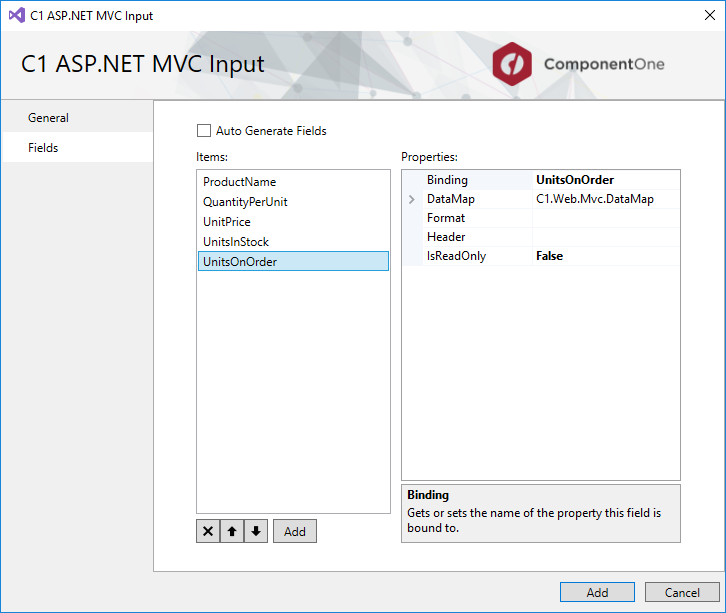
<br>
    ![C1Web Input Controls - Fields General UI](https://cdn.mescius.io/document-site-files/images/9b6a6cfe-b8e8-42e9-8a04-da6cb7762977/images/scaffolding_input_fields.png)
8. Click Add. You will notice that a Controller and five Views - Create, Delete, Details, Edit, and Index for the selected model are added to your project. The code generated for the Controller is as follows:

    ```csharp
    using System;
    using System.Collections.Generic;
    using System.Linq;
    using C1.Web.Mvc;
    using C1.Web.Mvc.Serializition;
    using System.Web;
    using System.Data;
    using System.Web.Mvc;
    using System.Data.Entity;
    // This code was generated by C1 Scaffolder.
    namespace C1MvcWebAppScaffolding.Controllers
    {
    public partial class Input2Controller : Controller
    {
    private C1MvcWebAppScaffolding.Models.C1NWindEntities db = new C1MvcWebAppScaffolding.Models.C1NWindEntities();
    public ActionResult Index()
    {
    var model = db.Products;
    return View(model);
    }
    public ActionResult Details(int key1)
    {
    var model = db.Products.Find(key1);
    if (model == null)
    {
    return HttpNotFound();
    }
    return View(model);
    }
    public ActionResult Create()
    {
    return View();
    }
    [HttpPost]
    [ValidateAntiForgeryToken]
    public ActionResult Create([Bind(Include = "ProductID,ProductName,SupplierID,CategoryID,QuantityPerUnit,UnitPrice,UnitsInStock,UnitsOnOrder,ReorderLevel,Discontinued")] C1MvcWebAppScaffolding.Models.Product product)
    {
    if (ModelState.IsValid)
    {
    db.Products.Add(product);
    db.SaveChanges();
    return RedirectToAction("Index");
    }
    return View(product);
    }
    public ActionResult Edit(int key1)
    {
    var model = db.Products.Find(key1);
    if (model == null)
    {
    return HttpNotFound();
    }
    return View(model);
    }
    [HttpPost]
    [ValidateAntiForgeryToken]
    public ActionResult Edit([Bind(Include = "ProductID,ProductName,SupplierID,CategoryID,QuantityPerUnit,UnitPrice,UnitsInStock,UnitsOnOrder,ReorderLevel,Discontinued")] C1MvcWebAppScaffolding.Models.Product product)
    {
    if (ModelState.IsValid)
    {
    db.Entry(product).State = EntityState.Modified;
    db.SaveChanges();
    return RedirectToAction("Index");
    }
    return View(product);
    }
    public ActionResult Delete(int key1)
    {
    var model = db.Products.Find(key1);
    if (model == null)
    {
    return HttpNotFound();
    }
    return View(model);
    }
    [HttpPost, ActionName("Delete")]
    [ValidateAntiForgeryToken]
    public ActionResult DeleteConfirmed(int key1)
    {
    var model = db.Products.Find(key1);
    db.Products.Remove(model);
    db.SaveChanges();
    return RedirectToAction("Index");
    }
    protected override void Dispose(bool disposing)
    {
    if (disposing)
    {
    db.Dispose();
    }
    base.Dispose(disposing);
    }
    }
    }
    ```

    The codes generated for the five views are as follows:
<br>
    **Create**

    ```razor
    @using C1.Web.Mvc
    @using C1.Web.Mvc.Fluent﻿
    @model C1MvcWebAppScaffolding.Models.Product
    <script>
    function timeChanged(sender) {
    var date = sender.value;
    var hour = date.getHours();
    var min = date.getMinutes();
    var second = date.getSeconds();
    var inputDate = wijmo.Control.getControl("#inputDateFor" + sender.hostElement.id);
    inputDate.value.setHours(hour);
    inputDate.value.setMinutes(min);
    inputDate.value.setSeconds(second);
    inputDate.refresh();
    }
    </script>
    @using (Html.BeginForm())
    {
    @Html.AntiForgeryToken()
    <div class="form-horizontal">
    <h4>Product</h4>
    <hr />
    @Html.ValidationSummary(true, "", new { @class = "text-danger" })
    <div class="form-group">
    @Html.LabelFor(model => model.ProductID, htmlAttributes: new { @class = "control-label col-md-2" })
    <div class="col-md-10">
    @Html.C1().InputNumberFor(model => model.ProductID).Required(false)
    @Html.ValidationMessageFor(model => model.ProductID, "", new { @class = "text-danger" })
    </div>
    </div>
    <div class="form-group">
    @Html.LabelFor(model => model.ProductName, htmlAttributes: new { @class = "control-label col-md-2" })
    <div class="col-md-10">
    @Html.C1().InputMaskFor(model => model.ProductName)
    @Html.ValidationMessageFor(model => model.ProductName, "", new { @class = "text-danger" })
    </div>
    </div>
    <div class="form-group">
    @Html.LabelFor(model => model.QuantityPerUnit, htmlAttributes: new { @class = "control-label col-md-2" })
    <div class="col-md-10">
    @Html.C1().InputMaskFor(model => model.QuantityPerUnit)
    @Html.ValidationMessageFor(model => model.QuantityPerUnit, "", new { @class = "text-danger" })
    </div>
    </div>
    <div class="form-group">
    @Html.LabelFor(model => model.UnitPrice, htmlAttributes: new { @class = "control-label col-md-2" })
    <div class="col-md-10">
    @Html.C1().InputNumberFor(model => model.UnitPrice).Required(false)
    @Html.ValidationMessageFor(model => model.UnitPrice, "", new { @class = "text-danger" })
    </div>
    </div>
    <div class="form-group">
    @Html.LabelFor(model => model.UnitsInStock, htmlAttributes: new { @class = "control-label col-md-2" })
    <div class="col-md-10">
    @Html.C1().InputNumberFor(model => model.UnitsInStock).Required(false)
    @Html.ValidationMessageFor(model => model.UnitsInStock, "", new { @class = "text-danger" })
    </div>
    </div>
    <div class="form-group">
    @Html.LabelFor(model => model.UnitsOnOrder, htmlAttributes: new { @class = "control-label col-md-2" })
    <div class="col-md-10">
    @Html.C1().InputNumberFor(model => model.UnitsOnOrder).Required(false)
    @Html.ValidationMessageFor(model => model.UnitsOnOrder, "", new { @class = "text-danger" })
    </div>
    </div>
    <div class="form-group">
    <div>
    <input type="submit" value="Create"/>
    </div>
    </div>
    </div>
    }
    <div>
    @Html.ActionLink("Back to List", "Index")
    </div>
    ```

    **Delete**

    ```razor
    @using C1.Web.Mvc
    @using C1.Web.Mvc.Fluent
    @model C1MvcWebAppScaffolding.Models.Product
    <h3>Are you sure you want to delete this?</h3>
    <div>
    <h4>Product</h4>
    <hr />
    <dl class="dl-horizontal">
    <dt>
    @Html.DisplayNameFor(model => model.ProductName)
    </dt>
    <dd>
    @Html.DisplayFor(model => model.ProductName)
    </dd>
    <dt>
    @Html.DisplayNameFor(model => model.QuantityPerUnit)
    </dt>
    <dd>
    @Html.DisplayFor(model => model.QuantityPerUnit)
    </dd>
    <dt>
    @Html.DisplayNameFor(model => model.UnitPrice)
    </dt>
    <dd>
    @Html.DisplayFor(model => model.UnitPrice)
    </dd>
    <dt>
    @Html.DisplayNameFor(model => model.UnitsInStock)
    </dt>
    <dd>
    @Html.DisplayFor(model => model.UnitsInStock)
    </dd>
    <dt>
    @Html.DisplayNameFor(model => model.UnitsOnOrder)
    </dt>
    <dd>
    @Html.DisplayFor(model => model.UnitsOnOrder)
    </dd>
    </dl>
    @using (Html.BeginForm()) {
    @Html.AntiForgeryToken()
    <div class="form-actions no-color">
    <input type="submit" value="Delete" class="btn btn-default" /> |
    @Html.ActionLink("Back to List", "Index")
    </div>
    }
    </div>
    ```

    **Details**

    ```razor
    @using C1.Web.Mvc
    @using C1.Web.Mvc.Fluent
    @model C1MvcWebAppScaffolding.Models.Product
    <div>
    <h4>Product</h4>
    <hr />
    <dl class="dl-horizontal">
    <dt>
    @Html.DisplayNameFor(model => model.ProductName)
    </dt>
    <dd>
    @Html.DisplayFor(model => model.ProductName)
    </dd>
    <dt>
    @Html.DisplayNameFor(model => model.QuantityPerUnit)
    </dt>
    <dd>
    @Html.DisplayFor(model => model.QuantityPerUnit)
    </dd>
    <dt>
    @Html.DisplayNameFor(model => model.UnitPrice)
    </dt>
    <dd>
    @Html.DisplayFor(model => model.UnitPrice)
    </dd>
    <dt>
    @Html.DisplayNameFor(model => model.UnitsInStock)
    </dt>
    <dd>
    @Html.DisplayFor(model => model.UnitsInStock)
    </dd>
    <dt>
    @Html.DisplayNameFor(model => model.UnitsOnOrder)
    </dt>
    <dd>
    @Html.DisplayFor(model => model.UnitsOnOrder)
    </dd>
    </dl>
    </div>
    <p>
    @Html.ActionLink("Edit", "Edit", new {key1=Model.ProductID}) |
    @Html.ActionLink("Back to List", "Index")
    </p>
    ```

    **Edit**

    ```razor
    @using C1.Web.Mvc
    @using C1.Web.Mvc.Fluent
    @model C1MvcWebAppScaffolding.Models.Product
    <script>
    function timeChanged(sender) {
    var date = sender.value;
    var hour = date.getHours();
    var min = date.getMinutes();
    var second = date.getSeconds();
    var inputDate = wijmo.Control.getControl("#inputDateFor" + sender.hostElement.id);
    inputDate.value.setHours(hour);
    inputDate.value.setMinutes(min);
    inputDate.value.setSeconds(second);
    inputDate.refresh();
    }
    </script>
    @using (Html.BeginForm())
    {
    @Html.AntiForgeryToken()
    <div class="form-horizontal">
    <h4>Product</h4>
    <hr />
    @Html.ValidationSummary(true, "", new { @class = "text-danger" })
    @Html.HiddenFor(model => model.ProductID)
    <div class="form-group">
    @Html.LabelFor(model => model.ProductName, htmlAttributes: new { @class = "control-label col-md-2" })
    <div class="col-md-10">
    @Html.C1().InputMaskFor(model => model.ProductName)
    @Html.ValidationMessageFor(model => model.ProductName, "", new { @class = "text-danger" })
    </div>
    </div>
    <div class="form-group">
    @Html.LabelFor(model => model.QuantityPerUnit, htmlAttributes: new { @class = "control-label col-md-2" })
    <div class="col-md-10">
    @Html.C1().InputMaskFor(model => model.QuantityPerUnit)
    @Html.ValidationMessageFor(model => model.QuantityPerUnit, "", new { @class = "text-danger" })
    </div>
    </div>
    <div class="form-group">
    @Html.LabelFor(model => model.UnitPrice, htmlAttributes: new { @class = "control-label col-md-2" })
    <div class="col-md-10">
    @Html.C1().InputNumberFor(model => model.UnitPrice).Required(false)
    @Html.ValidationMessageFor(model => model.UnitPrice, "", new { @class = "text-danger" })
    </div>
    </div>
    <div class="form-group">
    @Html.LabelFor(model => model.UnitsInStock, htmlAttributes: new { @class = "control-label col-md-2" })
    <div class="col-md-10">
    @Html.C1().InputNumberFor(model => model.UnitsInStock).Required(false)
    @Html.ValidationMessageFor(model => model.UnitsInStock, "", new { @class = "text-danger" })
    </div>
    </div>
    <div class="form-group">
    @Html.LabelFor(model => model.UnitsOnOrder, htmlAttributes: new { @class = "control-label col-md-2" })
    <div class="col-md-10">
    @Html.C1().InputNumberFor(model => model.UnitsOnOrder).Required(false)
    @Html.ValidationMessageFor(model => model.UnitsOnOrder, "", new { @class = "text-danger" })
    </div>
    </div>
    <div class="form-group">
    <div>
    <input type="submit" value="Save"/>
    </div>
    </div>
    </div>
    }
    <div>
    @Html.ActionLink("Back to List", "Index")
    </div>
    ```

    **Index**

    ```razor
    @using C1.Web.Mvc
    @using C1.Web.Mvc.Fluent
    @model IEnumerable<C1MvcWebAppScaffolding.Models.Product>
    <p>
    @Html.ActionLink("Create New", "Create")
    </p>
    <table class="table">
    <tr>
    <th>
    @Html.DisplayNameFor(model => model.ProductName)
    </th>
    <th>
    @Html.DisplayNameFor(model => model.QuantityPerUnit)
    </th>
    <th>
    @Html.DisplayNameFor(model => model.UnitPrice)
    </th>
    <th>
    @Html.DisplayNameFor(model => model.UnitsInStock)
    </th>
    <th>
    @Html.DisplayNameFor(model => model.UnitsOnOrder)
    </th>
    <th></th>
    </tr>
    @foreach (var item in Model) {
    <tr>
    <td>
    @Html.DisplayFor(model => item.ProductName)
    </td>
    <td>
    @Html.DisplayFor(model => item.QuantityPerUnit)
    </td>
    <td>
    @Html.DisplayFor(model => item.UnitPrice)
    </td>
    <td>
    @Html.DisplayFor(model => item.UnitsInStock)
    </td>
    <td>
    @Html.DisplayFor(model => item.UnitsOnOrder)
    </td>
    <td>
    @Html.ActionLink("Edit", "Edit", new {key1=item.ProductID}) |
    @Html.ActionLink("Details", "Details", new {key1=item.ProductID}) |
    @Html.ActionLink("Delete", "Delete", new {key1=item.ProductID})
    </td>
    </tr>
    }
    </table>
    ```
9. Run the project.

![C1Web Input Controls - Scaffold project demo](https://cdn.mescius.io/document-site-files/images/9b6a6cfe-b8e8-42e9-8a04-da6cb7762977/images/scaffoldingininput.png)