# Calculation Precision

## Content

FlexSheet allows you to set the number of digits after the decimal point to round to when calculating formulas using [CalculationPrecision](/componentone/api/mvc/online-mvc-core/dotnet-api/C1.AspNetCore.Mvc.FlexSheet/C1.Web.Mvc.Sheet.FlexSheet.CalculationPrecision.html) property of the [FlexSheet](/componentone/api/mvc/online-mvc-core/dotnet-api/C1.AspNetCore.Mvc.FlexSheet/C1.Web.Mvc.Sheet.FlexSheet.html) class. Please note that setting the negative value for the **CalculationPrecision** property, then rounding will not be performed.
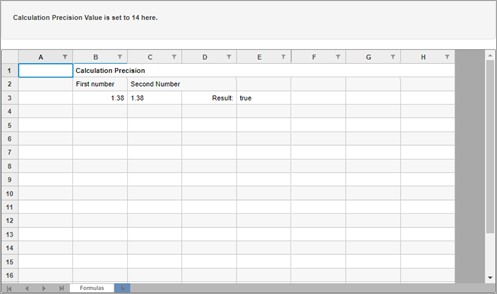
![C1Web FlexSheet - Calculation Precision](https://cdn.mescius.io/document-site-files/images/9b6a6cfe-b8e8-42e9-8a04-da6cb7762977/images/flexsheet-calculation-precision.png)
The following code demonstrates the use of CalculationPrecision property. This example uses the `calculationPrecision.js` file.
**Controller code**

```csharp
public IActionResult Index( int val=14)
{
    int CalculationPrecision = val;
    return View(CalculationPrecision);
}
```

**View Code**

```razor
@model int 
@section Scripts{<script type="text/javascript" src="~/js/flexSheet/calculationPrecision.js"></script>} 
<style> 
        .btn { 
            margin-bottom: 0; 
        } 
    </style>
<div> 
    <div class="copy"> 
        <h3>Calculation Precision</h3> 
    </div> 
    <div class="row"> 
        <div class="col-md-12 col-xs-24"> 
            <div class="form-inline well well-lg">
                Calculation precision value: 
                <input type="text" class="form-control " value="@Model" id="precisionVal" /> 
                <button type="button" class="btn btn-default" onclick="setCalculationPrecision()">OK</button> 
            </div> 
        </div> 
    </div> 
    <div> 
        <c1-flex-sheet id="formulaSheet" class="flexSheet" calculation-precision="@Model" selection-changed="SetCellContent"> 
            <c1-unbound-sheet name="Formulas" row-count="20" 
                              column-count="8"></c1-unbound-sheet> 
        </c1-flex-sheet> 
    </div> 
</div>
```