# Table
## Content
In the FlexSheet control, you can easily turn a range of cells into a table with data source. To add tables in the **FlexSheet** control, firstly, you need to add an unbound sheet, and then use its instance to access the **Tables** method, which allows you to add a table in your FlexSheet. To populate data and setting up the table, you need to set some basic methods, such as **Name**, **Range**, and **Bind** provided by the TableBuilder class. The columns are auto generated in the Table. However, in case you want to specify the columns in a different order or specify limited number of columns, you can use the **Add** method. Apart from this, you can also apply styles to the table with the help of [TableStyle](/componentone/api/mvc/online-mvc-core/dotnet-api/C1.AspNetCore.Mvc.FlexSheet/C1.Web.Mvc.Sheet.TableStyle.html) class.
The following image shows a table in the FlexSheet control.
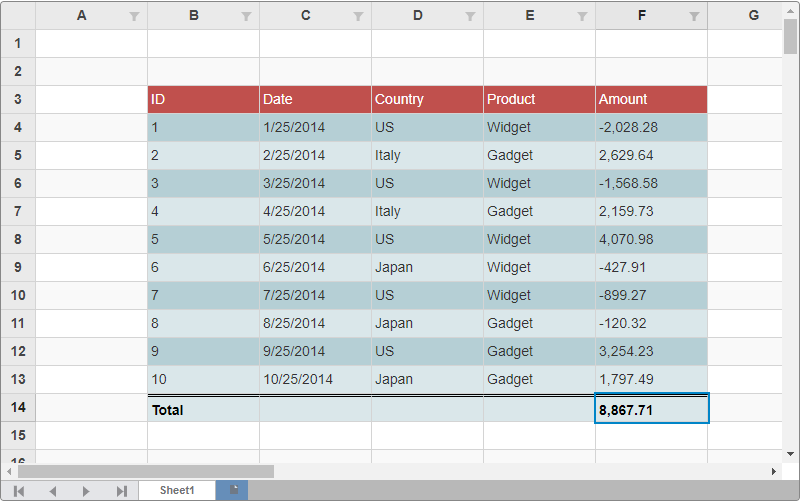
The following code snippets shows how to add a table in the FlexSheet control.
**Model - Sale.cs**
```csharp
public class Sale
{
public int ID { get; set; }
public DateTime Date { get; set; }
public string Country { get; set; }
public string Product { get; set; }
public double Amount { get; set; }
public bool Active { get; set; }
private static List COUNTRIES = new List { "US", "Germany", "UK", "Japan", "Italy", "Greece" };
private static List PRODUCTS = new List { "Widget", "Gadget", "Doohickey" };
public static IEnumerable GetData(int total)
{
var rand = new Random(0);
var list = Enumerable.Range(0, total).Select(i =>
{
var country = COUNTRIES[rand.Next(0, COUNTRIES.Count - 1)];
var product = PRODUCTS[rand.Next(0, PRODUCTS.Count - 1)];
var date = new DateTime(2014, i % 12 + 1, 25);
return new Sale
{
ID = i + 1,
Date = date,
Country = country,
Product = product,
Amount = Math.Round(rand.NextDouble() * 10000 - 5000, 2),
Active = (i % 4 == 0)
};
});
return list;
}
}
```
**View - Index.csthml**
```html
@{
var style = C1.Web.Mvc.Sheet.TableStyle.CreateBuiltInTableStyleDark(9);
var range = new C1.Web.Mvc.Grid.CellRange(2, 1,3,4);
}
```