# Creating
## Content
CollectionView supports various server-side operations, including creating, reading, updating, deleting and editing of the field in data-bound controls, such as FlexGrid.
This example shows how to use **Edit** request of [CollectionViewHelper](/componentone/api/mvc/online-mvc-core/dotnet-api/C1.AspNetCore.Mvc/C1.Web.Mvc.CollectionViewHelper.html), which allows adding records to source database in data-bound controls, such as FlexGrid. Here, the **GridCreateCategory** action of the controller is assigned to the Create property of FlexGrid's [ItemSource](/componentone/api/mvc/online-mvc-core/dotnet-api/C1.AspNetCore.Mvc/C1.Web.Mvc.IItemsSource-1.html).
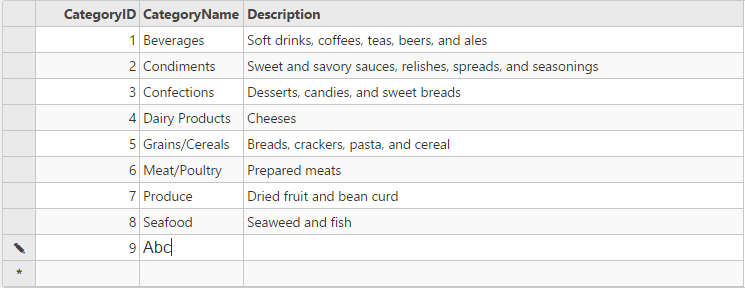
The following image shows how the FlexGrid appears after the [AllowAddNew](/componentone/api/mvc/online-mvc-core/dotnet-api/C1.AspNetCore.Mvc/C1.Web.Mvc.FlexGridBase-1.AllowAddNew.html) property is set to true, and [CollectionViewEditRequest](/componentone/api/mvc/online-mvc-core/dotnet-api/C1.AspNetCore.Mvc/C1.Web.Mvc.CollectionViewEditRequest-1.html) is used in the controller.
The example uses C1NWind datasource, which was configured in the application in the [Quick Start](/componentone/docs/mvc/online-mvc-core/WorkingwithControls/CollectionView/CVQuickStart):
The following code example demonstrates how to use **Create** property of FlexGrid's [ItemSource](/componentone/api/mvc/online-mvc-core/dotnet-api/C1.AspNetCore.Mvc/C1.Web.Mvc.IItemsSource-1.html) and [CollectionViewEditRequest](/componentone/api/mvc/online-mvc-core/dotnet-api/C1.AspNetCore.Mvc/C1.Web.Mvc.CollectionViewEditRequest-1.html) to enable creation of a record in the FlexGrid:
#### In Code
**CreateController.cs**
```csharp
//Define datasource for FlexGrid
private C1NWindEntities db = new C1NWindEntities();
public ActionResult Index()
{
return View(db);
}
//Instantiate a JSON request
public ActionResult GridReadCategory([C1JsonRequest] CollectionViewRequest requestData)
{
return this.C1Json(CollectionViewHelper.Read(requestData, db.Categories));
}
public ActionResult GridCreateCategory([C1JsonRequest]CollectionViewEditRequest requestData)
{
var category = requestData.OperatingItems.First();
if (category.CategoryName == null)
{
category.CategoryName = "";
}
return Create(requestData, db.Categories);
}
private ActionResult Create(CollectionViewEditRequest requestData, DbSet data) where T : class
{
return this.C1Json(CollectionViewHelper.Edit(requestData, item =>
{
string error = string.Empty;
bool success = true;
try
{
data.Add(item);
db.SaveChanges();
}
catch (DbEntityValidationException e)
{
error = string.Join(",", e.EntityValidationErrors.Select(result =>
{
return string.Join(",", result.ValidationErrors.Select(err => err.ErrorMessage));
}));
success = false;
}
catch (Exception e)
{
error = e.Message;
success = false;
}
return new CollectionViewItemResult
{
Error = error,
Success = success && ModelState.IsValid,
Data = item
};
}, () => data.ToList()));
}
```
In this example, the **GridCreateCategory** action is assigned to the Create property of FlexGrid's [ItemSource](/componentone/api/mvc/online-mvc-core/dotnet-api/C1.AspNetCore.Mvc/C1.Web.Mvc.IItemsSource-1.html).
**Create.cshtml**
```html
```