# Tracking Changes

## Content


The **CollectionView** class can keep track of changes made to the data. It is useful in situations where you must submit changes to the server. To turn on change tracking, set the **TrackChanges** property to true. Once you do that, the **CollectionView** starts tracking the changes made to the data and exposes them using the following:

*   **ItemsEdited**: This list contains items that are edited using the **BeginEdit** and **CommitEdit** methods.
*   **ItemsAdded**: This list contains items that are added using the **AddNew** and **CommitNew** methods.
*   **ItemsRemoved**: This list contains items that are removed using the **Remove** method.


> type=note
> Make sure that the **DisableServerRead** property of [ItemSource](/componentone/api/mvc/online-mvc-core/dotnet-api/C1.AspNetCore.Mvc/C1.Web.Mvc.IItemsSource-1.html) is set to **True** if filtering, paging, sorting is to be performed on data available at client side only.

The example uses **C1NWind** datasource, for which the configuration in the [Quick Start](/componentone/docs/mvc/online-mvc-core/WorkingwithControls/CollectionView/CVQuickStart) application. The following image shows how the FlexGrid appears after the **TrackChanges** property is set to **true**.
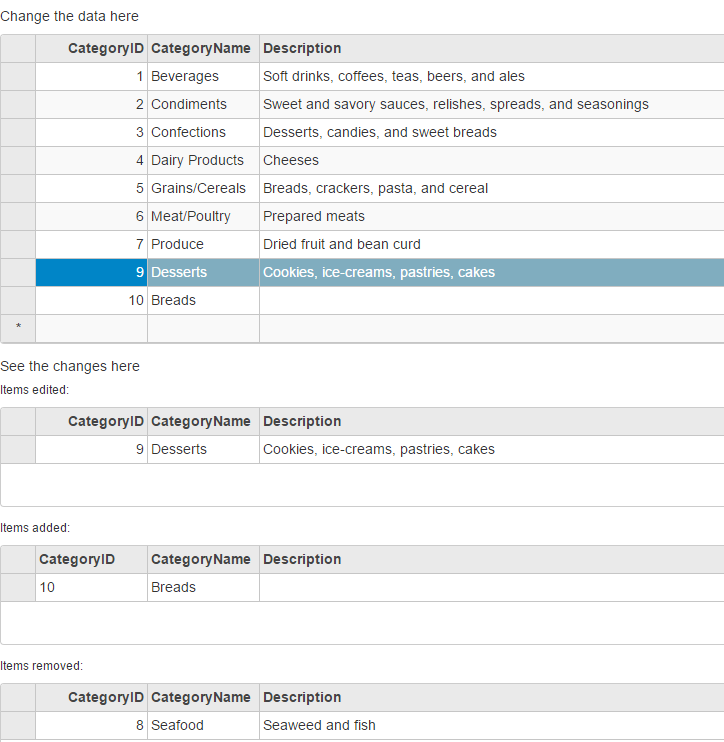
![](https://cdn.mescius.io/document-site-files/images/9b6a6cfe-b8e8-42e9-8a04-da6cb7762977/images/collectionviewtrackchanges.png)

The following code example demonstrates how to initialize a FlexGrid, and keep a track of changes by using **TrackChanges** property of the CollectionView.

#### In Code

**TrackChangesController.cs**

```csharp
private C1NWindEntities db = new C1NWindEntities();
public ActionResult Index()
{
    return View(db);
}
```

**TrackChanges.cshtml**

### ASP.NET Core

```dotnet
<h5>Change the data here</h5>
<c1-flex-grid  id="tcMainGrid" auto-generate-columns="false"
               allow-add-new="true" allow-delete="true">
    <c1-items-source source-collection="@Model" disable-server-read="true"></c1-items-source>
    <c1-flex-grid-column binding="CategoryID"></c1-flex-grid-column>
    <c1-flex-grid-column binding="CategoryName"></c1-flex-grid-column>
    <c1-flex-grid-column binding="Description" width="*"></c1-flex-grid-column>
</c1-flex-grid>
<h5>See the changes here</h5>
<h6>Items edited:</h6>
<c1-flex-grid  id="tcEditedGrid" auto-generate-columns="false"
               is-read-only="true" height="100">
    <c1-items-source source-collection="@Model"></c1-items-source>
    <c1-flex-grid-column binding="CategoryID" is-read-only="true"></c1-flex-grid-column>
    <c1-flex-grid-column binding="CategoryName"></c1-flex-grid-column>
    <c1-flex-grid-column binding="Description" width="*"></c1-flex-grid-column>
</c1-flex-grid>
<h6>Items added:</h6>
<c1-flex-grid  id="tcAddedGrid" auto-generate-columns="false"
               is-read-only="true" height="100">
    <c1-items-source source-collection="@Model"></c1-items-source>
    <c1-flex-grid-column binding="CategoryID" is-read-only="true"></c1-flex-grid-column>
    <c1-flex-grid-column binding="CategoryName"></c1-flex-grid-column>
    <c1-flex-grid-column binding="Description" width="*"></c1-flex-grid-column>
</c1-flex-grid>
<h6>Items removed:</h6>
<c1-flex-grid  id="tcRemovedGrid" auto-generate-columns="false"
               is-read-only="true" height="100">
    <c1-items-source source-collection="@Model"></c1-items-source>
    <c1-flex-grid-column binding="CategoryID" is-read-only="true"></c1-flex-grid-column>
    <c1-flex-grid-column binding="CategoryName"></c1-flex-grid-column>
    <c1-flex-grid-column binding="Description" width="*"></c1-flex-grid-column>
</c1-flex-grid>
```

### JS

```javascript
<script>
   $(document).ready(function () {
       //Tracking changes
        tcMainGrid = wijmo.Control.getControl('#tcMainGrid');// the flexGrid to edit the data
        tcEditedGrid = wijmo.Control.getControl('#tcEditedGrid'); // the flexGrid to record the edited items
        tcAddedGrid = wijmo.Control.getControl('#tcAddedGrid'); // the flexGrid to record the added items
        tcRemovedGrid = wijmo.Control.getControl('#tcRemovedGrid'); // the flexGrid to record the removed items
        cvTrackingChanges = tcMainGrid.itemsSource;
       tcEditedGrid.itemsSource = cvTrackingChanges.itemsEdited;
       tcAddedGrid.itemsSource = cvTrackingChanges.itemsAdded;
       tcRemovedGrid.itemsSource = cvTrackingChanges.itemsRemoved;
       // track changes of the collectionview
        cvTrackingChanges.trackChanges = true;
   });
   //Tracking changes
    var tcMainGrid = null,
       tcEditedGrid = null,
       tcAddedGrid = null,
       tcRemovedGrid = null,
       cvTrackingChanges = null;
</script>
```