# Appearance Customization
## Content
Calendar allows you to customize its appearance in different ways based on your requirements. You can choose to change the first day of the week displayed in the calendar, change the display format of the days and months, change calendar type, and hide the header and adjacent days. Let us dive into the details of all these features and their implementation in the following sections.
## Set First Day of Week
By default, Calendar displays "Sunday" as the first day of the week. However, you can change it to display the first day of the week depending on your local culture using [FirstDayOfWeek](/componentone/api/maui/online-maui/dotnet-api/C1.Maui.Calendar/C1.Maui.Calendar.C1Calendar.FirstDayOfWeek.html) property of the [C1Calendar](/componentone/api/maui/online-maui/dotnet-api/C1.Maui.Calendar/C1.Maui.Calendar.C1Calendar.html) class. The **FirstDayOfWeek** property uses **DayOfWeek** enumeration to specify the day of week to be set as the first day of the calendar week.
The following image shows Monday set as the first day of the calendar week.
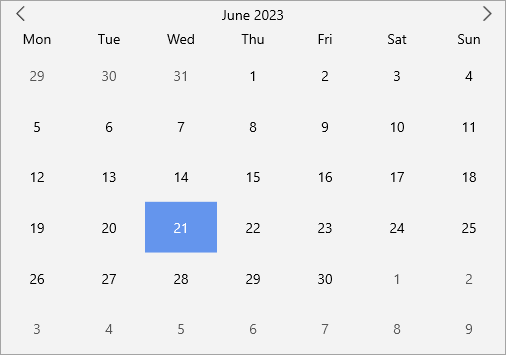
The following code uses the **FirstDayOfWeek** property to set "Monday" as the first week in the Calendar:
**xml**
```xml
```
**csharp**
```csharp
calendar.FirstDayOfWeek = DayOfWeek.Monday;
```
## Customize Days of Week and Month Formats
Calendar allows you to specify formats for displaying the names of the days in a week and the calendar months. You can set the format for representing the names of days in a week by using [DayOfWeekFormat](/componentone/api/maui/online-maui/dotnet-api/C1.Maui.Calendar/C1.Maui.Calendar.C1Calendar.DayOfWeekFormat.html) property of the **C1Calendar** class. Similarly, you can use [HeaderMonthFormat](/componentone/api/maui/online-maui/dotnet-api/C1.Maui.Calendar/C1.Maui.Calendar.C1Calendar.HeaderMonthFormat.html) property of the C1Calendar class to set the format for displaying month of the year in the Calendar control.
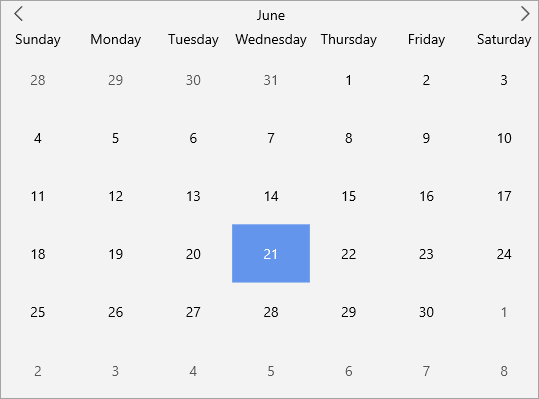
The following code showcases the use of **DayOfWeekFormat** and **HeaderMonthFormat** property to set the "dddd" day format and "MMMM" month format in the control, respectively.
**xml**
```xml
```
**csharp**
```csharp
calendar.DayOfWeekFormat = "dddd";
calendar.HeaderMonthFormat = "MMMM";
```
### Customize Header
In the Calendar control, the header region has a huge significance. This is because, the Header when clicked expands the views, namely month, year and decade view. To elaborate, when you click the header in the 'month' (default) view, it expands to show the current year in the year view mode. Likewise, when the header of the 'year' or 'decade' view is clicked, it expands to show the current 'decade' or expands back to the month view, respectively.
By default, Calendar displays the header. However, you can choose to hide the header area setting the [ShowHeader](/componentone/api/maui/online-maui/dotnet-api/C1.Maui.Calendar/C1.Maui.Calendar.C1Calendar.ShowHeader.html) property of the **C1Calendar** class to **false**.
The following image showcases calendar without the header.
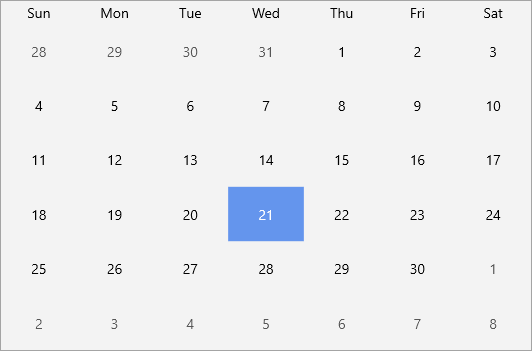
The following code shows how to hide the header by setting the **ShowHeader** property to false:
**xml**
```xml
```
**csharp**
```csharp
calendar.ShowHeader = false;
```
## Hide Adjacent Days
By default, the adjacent days are visible in the Calendar control. However, Calendar allows you to control the visibility of the adjacent days based on your requirements. It lets you choose whether to show the adjacent days at runtime. You can hide the adjacent days by setting the [ShowAdjacentDay](/componentone/api/maui/online-maui/dotnet-api/C1.Maui.Calendar/C1.Maui.Calendar.C1Calendar.ShowAdjacentDay.html) properties to **false**.
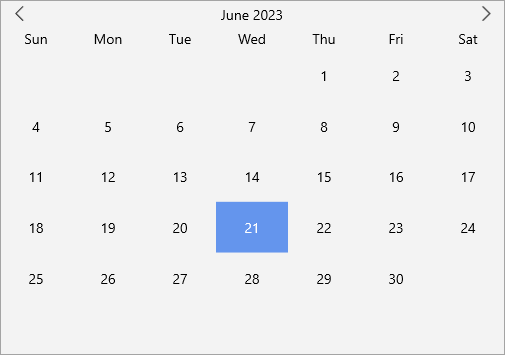
To hide the adjacent dates in the Calendar control, you can set the **ShowAdjacentDay** property to false.
**xml**
```xml
```
**csharp**
```csharp
calendar.ShowAdjacentDay = false;
```
### Calendar Type
The Calendar control lets you set three types of calendars which are listed in the following table.
| **Calendar Type** | **Snapshot** |
| --- | --- |
| Default | 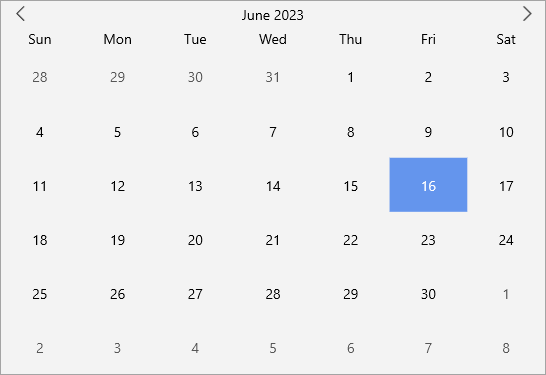 |
| Gregorian |  |
| Japanese | 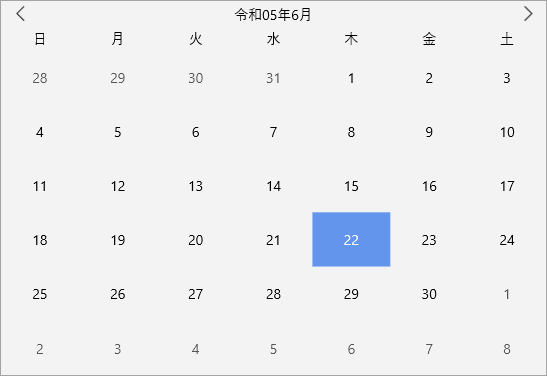 |
You can change the type of Calendar by setting the [CalendarType](/componentone/api/maui/online-maui/dotnet-api/C1.Maui.Calendar/C1.Maui.Calendar.C1Calendar.CalendarType.html) property of the **C1Calendar** class. The **CalendarType** property uses the [CalendarType](/componentone/api/maui/online-maui/dotnet-api/C1.Maui.Calendar/C1.Maui.Calendar.CalendarType.html) enumeration to specify the calendar type to display as shown in the code snippet below:
**xml**
```xml
```
**csharp**
```csharp
calendar.CalendarType = C1.Maui.Calendar.CalendarType.Japanese;
```