# Using Visual Studio Template
## Content
Visual Studio Project template allows you to create a simple MAUI application. A few additional steps are required to configure the project created using the basic Visual Studio project template and to use C1 MAUI controls with it.
This topic guides you through the steps of creating and configuring a MAUI application using the .NET MAUI project templates in Visual Studio 2022. First, you need to make sure to check the [System Requirements](/componentone/docs/maui/online-maui/get-started#requirements) before proceeding.
You need to perform the following steps to configure the project created using the Visual Studio project template and use the ComponentOne MAUI controls.
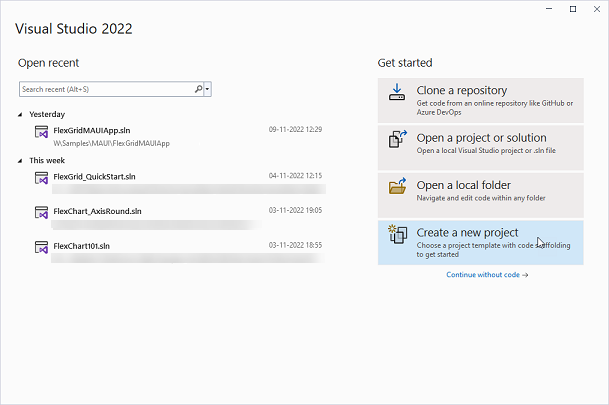
1. Open **Visual Studio** and select **Create a new project** from the **Get started** pane.
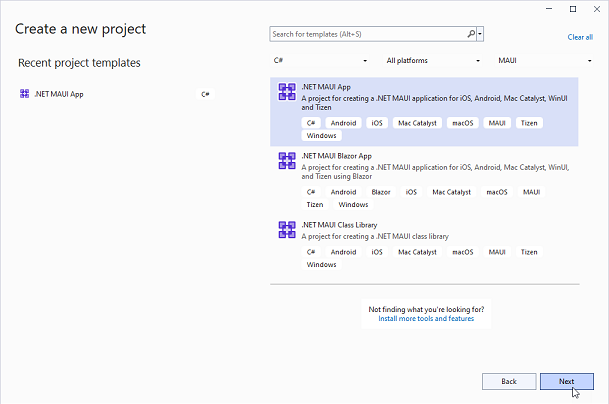
2. In the **Create a new project** window, select **C#** from the language drop-down and **MAUI** from the project drop-down.
3. Select the **.NET MAUI App** project type and click **Next**.
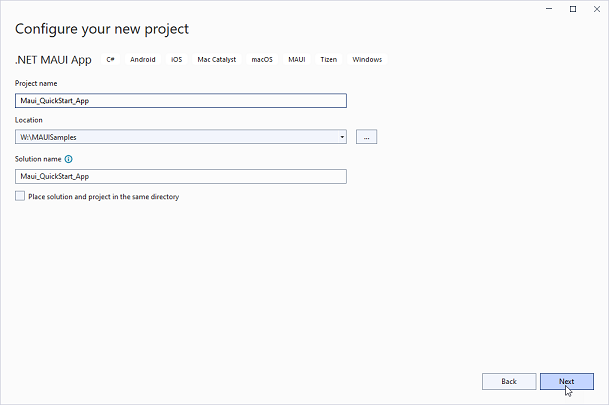
4. In the **Configure your new project** window, provide name of the project you want to create in the **Project name** field, say Maui\_QuickStart\_App, and location for the project in the **Location** field. Then, click **Next**.
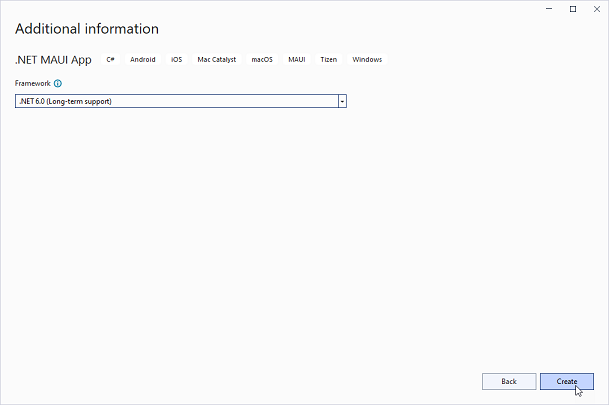
5. In the **Additional information** dialog, select the target framework from the **Framework** dropdown, if required and click **Create**. By default, the selected framework is **.NET 6.0**.
A new .NET MAUI app is created.
After creating a MAUI application, you can start using ComponentOne MAUI controls by installing any of the following NuGet packages as per your requirements:
* C1.Maui.Calendar
* C1.Maui.Core
* C1.Maui.Grid
* C1.Maui.GridControl
* C1.Maui.Input