# Node Operations
Add and remove nodes from TreeView for Blazor. Learn about Blazor TreeView control and its node operations in Blazor documentation.
## Content
In TreeView, nodes are arranged in a hierarchical form. You can perform various operations on these treeview nodes, such as adding and removing nodes. Let us explore how to perform these operations on nodes in following topics.
## Add a Node
You can add a node to the TreeView using either of the two methods, the **Add** or the **Insert** method. The **Add** method adds a child node at the end of the node collection for the currently selected root node. On the other hand, the **Insert** method can be used to add a child node at the specified index in a node collection for the currently selected root node.
The following GIF shows adding nodes in the TreeView.
**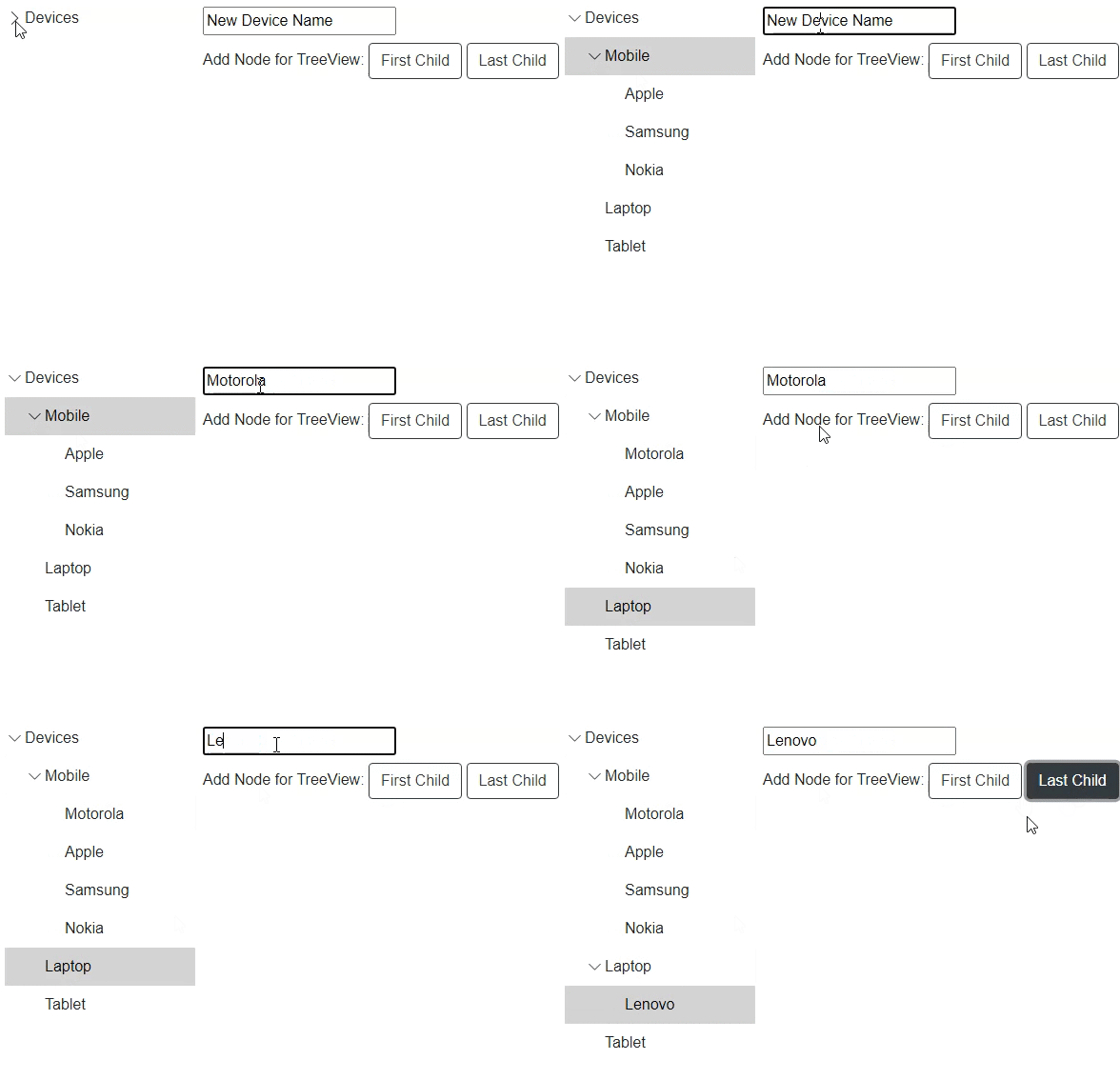**
The following code demonstrates how to add nodes in the TreeView control using both, the **Add** and the **Insert** method. In this example, we have added two buttons, one adds a child node for the selected root node at the end of the node collection and the other adds a child node at the specified index for a root node.
```razor
@using C1.Blazor.Core
@using C1.Blazor.TreeView
@using System.Collections.ObjectModel
Add Node for TreeView:
@code{
C1TreeView boundTreeView;
string newItemName = "New Device Name";
TreeViewItem boundTreeSelectedItem;
readonly C1Style _c1Style = new C1Style
{
Height = 500,
Width = 200,
};
#region Create data for Bound TreeView
readonly ObservableCollection _dataSource = new ObservableCollection()
{
new Directory()
{
Name = "Devices",
Expanded = true,
Subdirectories = new ObservableCollection
{
new Directory
{
Name = "Mobile",
Subdirectories = new ObservableCollection
{
new Directory {Name = "Apple"},
new Directory {Name = "Samsung"},
new Directory {Name = "Nokia"}
}
},
new Directory
{
Name = "Laptop",
},
new Directory
{
Name = "Tablet",
Subdirectories = new ObservableCollection()
}
}
}
};
public class Directory
{
public string Name { get; set; }
public ObservableCollection Subdirectories { get; set; } = new ObservableCollection();
public bool Expanded { get; set; }
}
```
## Remove a Node
You can remove a node from the TreeView programmatically by using the **Remove** method. This method removes the currently selected node from the TreeView.
The following GIF shows removing a node from the TreeView.
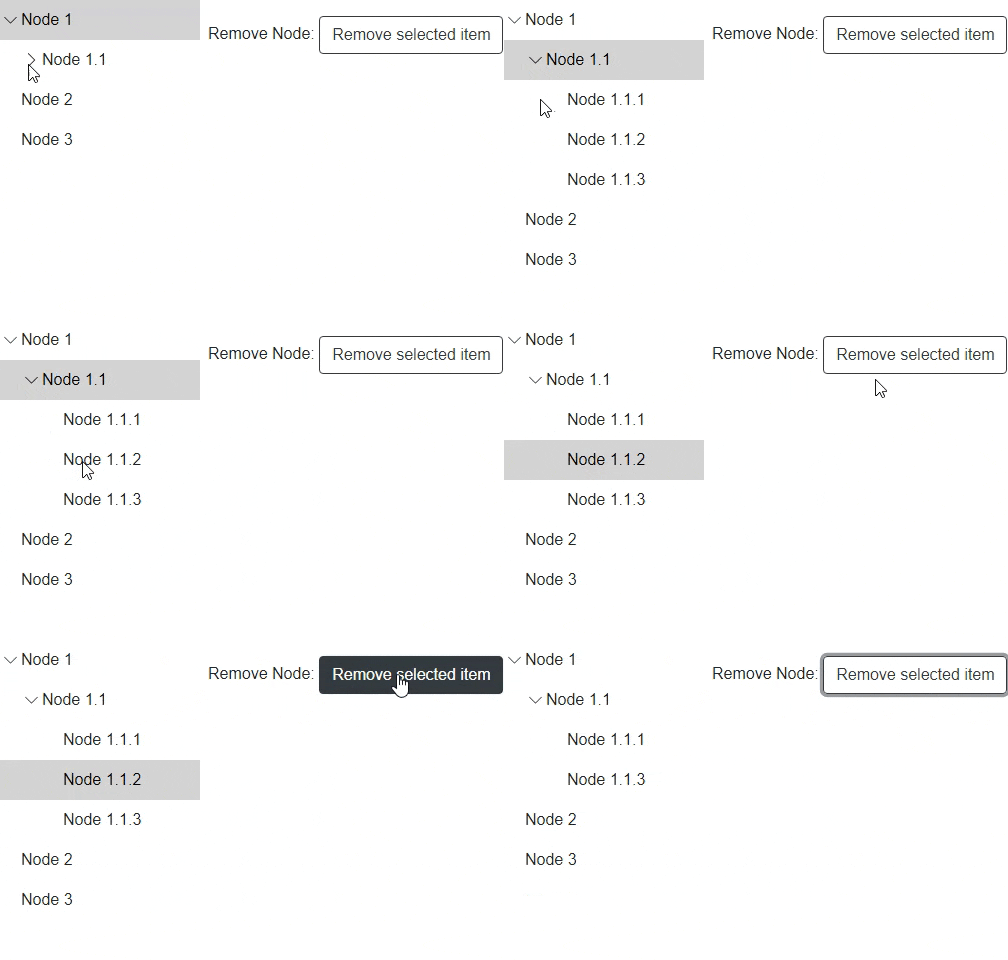
The following code demonstrates how to use the **Remove** method to remove a node from the TreeView control. In this example, we have added a button which when clicked removes the selected node from the TreeView.
```razor
@using C1.Blazor.Core
@using C1.Blazor.TreeView
@using System.Collections.ObjectModel
Remove Node:
@code{
C1TreeView treeView;
TreeViewItem selectedItem;
readonly C1Style _c1Style = new C1Style
{
Height = 300,
Width = 200,
};
readonly ObservableCollection _dataSource = new ObservableCollection()
{
new Directory()
{
Name = "Node 1",
Subdirectories = new ObservableCollection
{
new Directory
{
Name = "Node 1.1",
Subdirectories = new ObservableCollection
{
new Directory {Name = "Node 1.1.1"},
new Directory {Name = "Node 1.1.2"},
new Directory {Name = "Node 1.1.3"}
}
}
}
},
new Directory
{
Name = "Node 2",
},
new Directory
{
Name = "Node 3",
Subdirectories = new ObservableCollection()
}
};
public class Directory
{
public string Name { get; set; }
public ObservableCollection Subdirectories { get; set; }
}
protected override void OnAfterRender(bool firstRender)
{
if (firstRender)
treeView.Expand(treeView.GetAllItems().First());
}
public void OnSelectedItemChanged(TreeViewItem item)
{
selectedItem = item;
}
public void RemoveItem()
{
if (selectedItem != null)
selectedItem.ParentCollection.Remove(selectedItem);
}
}
```