# Item Template
Blazor Edition provides a set of native UI controls built for Blazor such as FlexGrid, Chart, ListView, and input controls including AutoComplete and ComboBox.
## Content
You can customize the Menu control by using special templates to render items and create your own view. These templates can be set by using the [ItemTemplate](/componentone/api/blazor/online-blazor/dotnet-api/C1.Blazor.Menu/C1.Blazor.Menu.C1MenuList.ItemTemplate.html) property and can be used to specify custom content in the Menu.
The following image shows the custom view of Menu created using ItemTemplates.
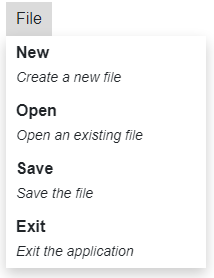
To create a custom view using ItemTemplates, use the following code.
```razor
@using C1.Blazor.Menu
@using C1.Blazor.Input
@code {
readonly IList _dataSource = new List()
{
new Hierarchical ()
{
Name = "File",
Subdirectories = new List
{
new Hierarchical {
Name = "New",
SubDescription = "Create a new file"
},
new Hierarchical {
Name = "Open",
SubDescription = "Open an existing file"
},
new Hierarchical {
Name = "Save",
SubDescription = "Save the file"
},
new Hierarchical {
Name = "Exit",
SubDescription = "Exit the application"
}
}
}
};
public class Hierarchical
{
public string Name { get; set; }
public List Subdirectories { get; set; }
public string SubDescription { get; set; }
}
}
```