# Checkbox Selection
Use checkbox for selection of items in the ListView control. Learn more about the checkbox selection in ListView in the Blazor documentation.
## Content
ListView supports item selection using check boxes. It allows you to display check boxes for each item in the ListView list and provides users the ability to select items. To display checkboxes against each list item in the ListView control, you can use [ShowCheckboxes](/componentone/api/blazor/online-blazor/dotnet-api/C1.Blazor.ListView/C1.Blazor.ListView.C1ListView-1.ShowCheckboxes.html) property of the [C1ListView](/componentone/api/blazor/online-blazor/dotnet-api/C1.Blazor.ListView/C1.Blazor.ListView.C1ListView-1.html) class.
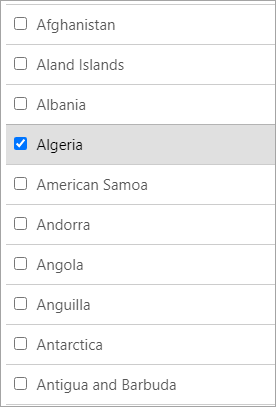
The following code demonstrates how you can display checkboxes against list items. This example uses the Customer class created in the [](virtualization.html)[Quick Start](/componentone/docs/blazor/online-blazor/controls/listview/listview-quick-start) topic.
```razor
@using C1.Blazor.ListView
@code{
IEnumerable countries;
protected override void OnInitialized()
{
countries = Country.GetCountries();
}
}
```
Furthermore, you can enable multiple selection in the ListView control having checkboxes against each item using the **ShowCheckboxes** property along with the [SelectionMode](/componentone/api/blazor/online-blazor/dotnet-api/C1.Blazor.ListView/C1.Blazor.ListView.C1ListView-1.SelectionMode.html) property. To know more about displaying multiple selection and other selection modes in the ListView control, see [Selection Modes](/componentone/docs/blazor/online-blazor/controls/listview/selection-modes) topic.