# Formatting
Blazor Edition provides a set of native UI controls built for Blazor such as FlexGrid, Chart, ListView, and input controls including AutoComplete and ComboBox.
## Content
You can set a particular format of the numeric value to be entered in the Numeric Box using [Format](/componentone/api/blazor/online-blazor/dotnet-api/C1.Blazor.Input/C1.Blazor.Input.C1NumericBox-1.Format.html) property of the [C1NumericBox](/componentone/api/blazor/online-blazor/dotnet-api/C1.Blazor.Input/C1.Blazor.Input.C1NumericBox-1.html) class. The image below shows the comma separated input format with two decimal places.
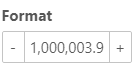
The following code example demonstrates how you can set a specific format for the numeric value in entered or displayed in the NumericBox control.
```razor