# View Documents
Blazor Edition provides a set of native UI controls built for Blazor such as FlexGrid, Chart, ListView, and input controls including AutoComplete and ComboBox.
## Content
FlexViewer allows you to view different types of documents such as PDF files, FlexReport and SSRS reports. Just with a few lines of code, you can easily render these files in the FlexViewer control. Let us explore it in detail in the following sections.
### View FlexReport
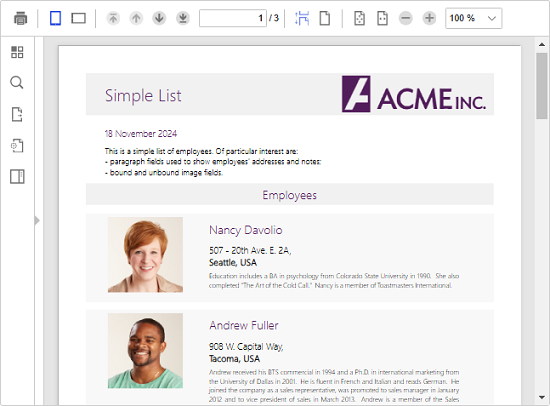
To view the report in FlexViewer, create an object of **C1DocumentSource** class and load the report into it using the **Load** method. Then, assign the object of the **C1DocumentSource** class to the **DocumentSource** property of the **FlexViewer** class. In this example, the report file is stored in the application within a folder named **Data**.
```razor
@using C1.Blazor.Viewer
@using C1.Blazor.Viewer.Model;
@using C1.Document;
@using C1.Report;
@inject IJSRuntime Js
@code {
C1DocumentSource docSource = DocSources.GetReport();
protected override void OnInitialized()
{
docSource.GenerateCompleted += (s, e) =>
{
if (e.Error != null)
{
Js.InvokeVoidAsync("alert", e.Error.Message);
docSource = null;
}
InvokeAsync(StateHasChanged);
};
docSource.GenerateAsync();
}
public class DocSources
{
public static C1DocumentSource GetReport()
{
var docSource = new C1.Report.FlexReport();
docSource.Load(@"Data/FlexCommonTasksSQLite.flxr", "Simple List");
return docSource;
}
}
}
```
### View PDF
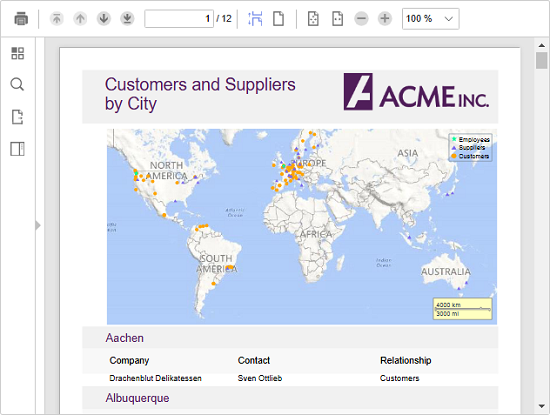
To view PDF files in the FlexViewer control, create an object of **C1DocumentSource** class. Then, fetch the location of the PDF file using **DocumentLocation** property and assign it to the object of the **C1DocumentSource** class. Finally, set the **DocumentSource** property of the **FlexViewer** class to the object of the **C1DocumentSource** class. In this example, the PDF file is stored in the application within a folder named **Data**.
```razor
@using C1.Blazor.Viewer
@using C1.Blazor.Viewer.Model;
@using C1.Document;
@using System.Net;
@inject IJSRuntime Js
@code {
C1DocumentSource docSource = DocSources.GetPdf();
protected override void OnInitialized()
{
docSource.GenerateCompleted += (s, e) =>
{
if (e.Error != null)
{
Js.InvokeVoidAsync("alert", e.Error.Message);
docSource = null;
}
InvokeAsync(StateHasChanged);
};
docSource.GenerateAsync();
}
public class DocSources
{
public static C1DocumentSource GetPdf()
{
var docSource = new C1PdfDocumentSource();
docSource.DocumentLocation = @"Data/DefaultDocument.pdf";
return docSource;
}
}
}
```
### View SSRS Report
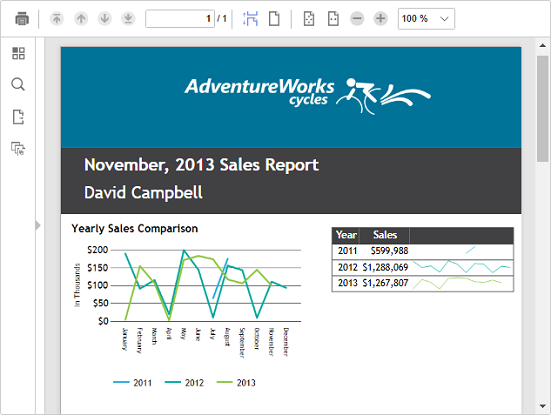
Similar to FlexReport and PDF file, you can view SSRS report in the FlexViewer control. To view the SSRS report, create a class named DocSources and then create a method named **GetSSRS** within the class. In this method, create an object of **C1SSRSDocumentSource** class, fetch the location of the SSRS report using **DocumentLocation** property and assign it to the object of **C1SSRSDocumentSource** class. Then, call the **GetSSRS** method and assign it to the object of **C1DocumentSource** class. Finally, assign the object of **C1DocumentSource** class to the **DocumentSource** property of the **FlexViewer** class. In this example, the SSRS report is fetched from a report server location by providing the required credentials.
```razor
@using C1.Blazor.Viewer
@using C1.Blazor.Viewer.Model;
@using C1.Document;
@using C1.Report;
@using System.Net;
@inject IJSRuntime Js
@code {
C1DocumentSource docSource = DocSources.GetSSRS();
protected override void OnInitialized()
{
docSource.GenerateCompleted += (s, e) =>
{
if (e.Error != null)
{
Js.InvokeVoidAsync("alert", e.Error.Message);
docSource = null;
}
InvokeAsync(StateHasChanged);
};
docSource.GenerateAsync();
}
public class DocSources
{
public static C1DocumentSource GetSSRS()
{
var c1SsrsDocumentSource1 = new C1SSRSDocumentSource();
c1SsrsDocumentSource1.Language = new System.Globalization.CultureInfo("en-US");
c1SsrsDocumentSource1.Credential = new NetworkCredential("ssrs_demo", "bjqveS5gh89BH1Q", "");
c1SsrsDocumentSource1.DocumentLocation = new SSRSReportLocation("http://ssrs.componentone.com:8000/ReportServer", "/AdventureWorks/Employee Sales Summary Detail");
return c1SsrsDocumentSource1;
}
}
}
```