# Grouping
Grouping collects the data together in an efficient way which makes it easier to understand the grid.
## Content
Grouping collects the data together in an efficient way which makes it easier to understand the grid. In FlexGrid, youcan display data that is groupedby invoking the **GroupAsync** method of the [C1DataCollection](/componentone/api/blazor/online-blazor/dotnet-api/C1.DataCollection/C1.DataCollection.C1DataCollection-1.html) class.
Group description objects are flexible, allowing you to group data based on value or on grouping functions. You can tap anywhere in the group row to expand or collapse grouped rows. TheGIF below shows how the FlexGrid appears after grouping.
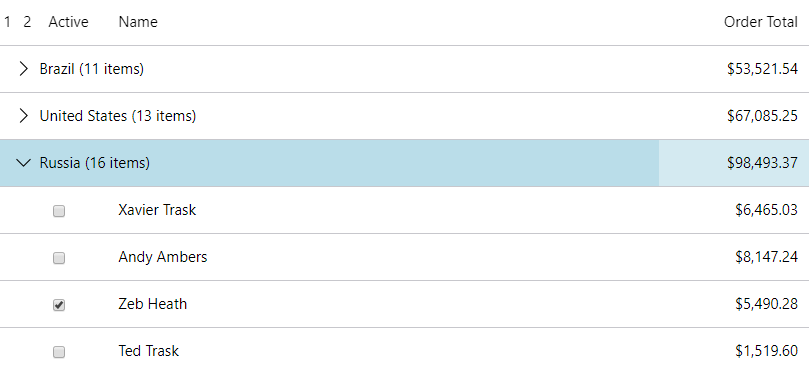
The following **code example** demonstrates how to apply Grouping in FlexGrid.
```razor
@page "/FlexGrid/Grouping"
@using System.Collections.ObjectModel;
@using C1.DataCollection
@using C1.Blazor.Core
@using C1.Blazor.Grid
@code
{
C1DataCollection items;
protected override async Task OnInitializedAsync()
{
var collectionView = new C1DataCollection(Customer.GetCustomerList(100));
await collectionView.GroupAsync(c => c.Country); items = collectionView;
}
}
```
### Aggregate functions
InFlexGrid columns have an **Aggregate** property that allows you to show data summaries. To show group aggregates, set the aggregate property on the columns that you want to aggregate using**GridAggregate** enumeration.
It specifies the type of aggregate values as describedin the table below. Refer to the code sample above for theimplementation of aggregate functions.
| **Member** | **Description** |
| --- | --- |
| _Average_ | Returns the average value of the non-null cells in the group. |
| _Count_ | Returns the count of non-null values in the group. |
| _Custom_ | Raise the CustomAggregate event to calculate custom aggregates. |
| _Maximum_ | Returns the maximum value in the group. |
| _Minimum_ | Returns the minimum value in the group. |
| _None_ | No aggregate. |
| _Range_ | Returns the difference between the maximum and minimum values in the group. |
| _Std_ | Returns the sample standard deviation of the values in the group (uses the formula based on n-1). |
| _StdPop_ | Returns the population standard deviation of the values in the group (uses the formula based on n). |
| _Sum_ | Returns the sum of all values in the group. |
| _Var_ | Returns the sample variance of the values in the group (uses the formula based on n-1). |
| _VarPop_ | Returns the population variance of the values in the group (uses the formula based on n). |