# Validations
Validation support for FlexGrid helps you to validate the data that you enter in the FlexGrid.
## Content
Validation support for FlexGrid helps you to validate the data that you enter in the FlexGrid. Validation implements simple client-side validation which further improves the user experience without writing a bulk of validation code. In FlexGrid, validation can be done by handling the [CellEditEnding](/componentone/api/blazor/online-blazor/dotnet-api/C1.Blazor.Grid/C1.Blazor.Grid.FlexGrid.CellEditEnding.html) event.
The GIF below shows the implementation of validation on the grid.
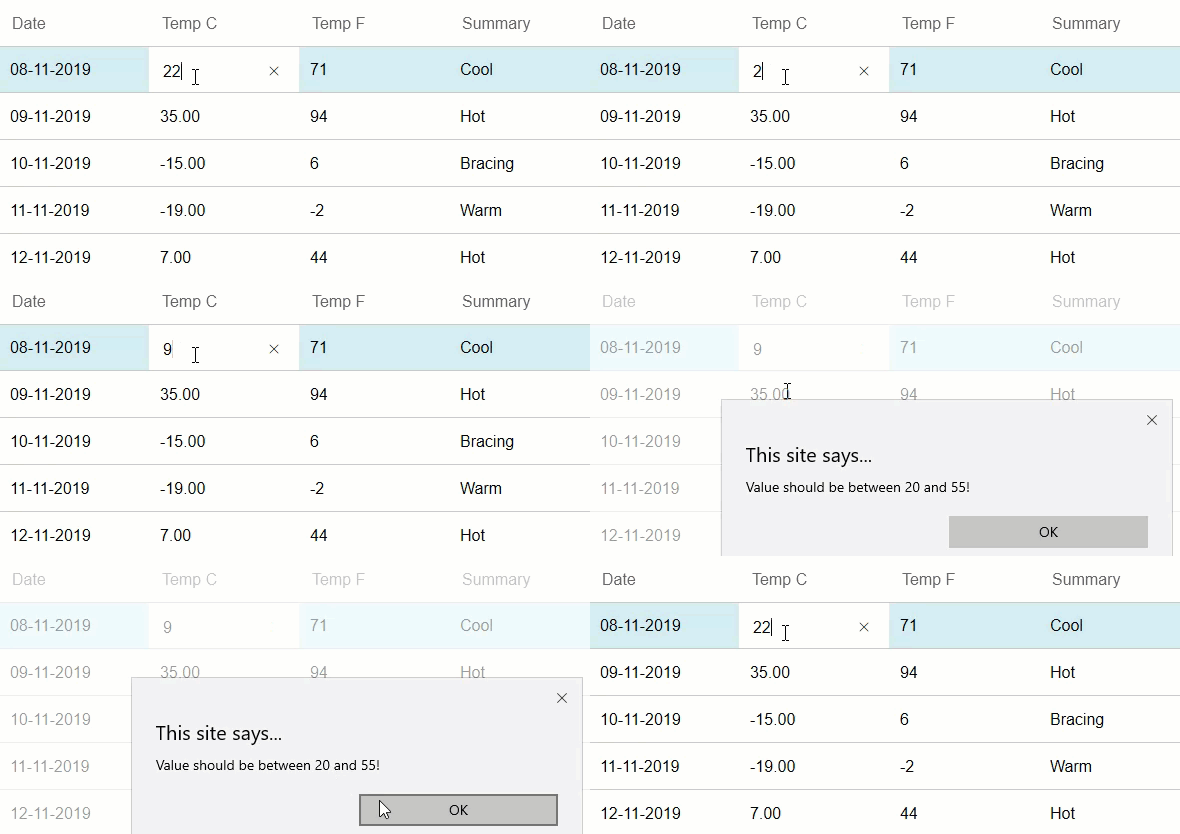
The following **code example** demonstrates how to apply validations in a FlexGrid.
```razor
@page "/validation"
@using BlazorIntro.Data
@using C1.Blazor.Core
@using C1.Blazor.Input
@using C1.Blazor.Grid
@using C1.DataCollection
@inject IJSRuntime JsRuntime
@inject WeatherForecastService ForecastService
FlexGrid Validation
@code {
WeatherForecast[] forecasts;
protected override async Task OnInitializedAsync()
{
forecasts = await ForecastService.GetForecastAsync(DateTime.Now);
}
public FlexGrid grid;
protected void OnCellEditEnding(object sender, GridCellEditEventArgs e)
{
var _originalValue = grid[e.CellRange.Row, e.CellRange.Column];
int value;
Int32.TryParse(((C1TextBox)grid.ActiveEditor).Text, out value);
ValidationMessage _res = isValidValue(value, grid.Columns[e.CellRange.Column].Binding);
if (_res != null && !(bool)_res.isVal)
{
e.Cancel = true;
DisplayAlert(_res.Message);
(grid.ActiveEditor as C1TextBox).Text = _originalValue.ToString();
}
}
private ValidationMessage isValidValue(object value, string prop)
{
if (prop == "TemperatureC" && ((int)value < 20 || (int)value > 55))
{
return new ValidationMessage() { isVal = false, Message = "Value should be between 20 and 55!" };
}
return new ValidationMessage() { isVal = true };
}
class ValidationMessage
{
public bool isVal { get; set; }
public string? Message { get; set; }
}
private Task DisplayAlert(string message)
{
return JsRuntime.InvokeAsync("alert", message).AsTask();
}
}
```