# Time Panel Customization
Blazor Edition allows you to modify the time span of the TimeEditor control. Learn more about the time span in Blazor documentation.
## Content
In addition to changing time formats, TimeEditor allows you to customize the clock type to show either a 12 hour clock or a 24 hour clock and also set the time span for the TimeEditor control. Let us dive into the details of how to achieve these in the following sections.
### Set Time Span
TimeEditor allows you to display a specific time span in the time panel and disable the rest which implies that you can restrict the selection to a specified range of time from the panel. This can be done using the [Min](/componentone/api/blazor/online-blazor/dotnet-api/C1.Blazor.DateTimeEditors/C1.Blazor.DateTimeEditors.C1TimeEditor.Min.html) and [Max](/componentone/api/blazor/online-blazor/dotnet-api/C1.Blazor.DateTimeEditors/C1.Blazor.DateTimeEditors.C1TimeEditor.Max.html) properties of the [C1TimeEditor](/componentone/api/blazor/online-blazor/dotnet-api/C1.Blazor.DateTimeEditors/C1.Blazor.DateTimeEditors.C1TimeEditor.html) class which allow you to set the time span as per your requirement by setting the minimum and maximum time values to be displayed for selection at runtime.
**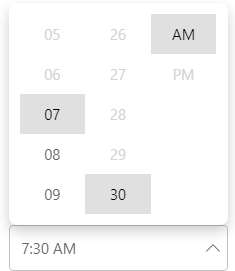**
You can display a specific time span enabled in the TimeEditor control using the **Min** and **Max** properties. In the following example, the time span for the TimeEditor control is set between 7:30 and 11:30 am using the Min and Max properties.
```csharp
```
### Set Clock Type
The TimeEditor control supports 12 hour and 24 hour clock type. By default, it displays the 12 hour clock but you can change the clock type based on your requirements. To change the clock type, you can use [ClockType](/componentone/api/blazor/online-blazor/dotnet-api/C1.Blazor.DateTimeEditors/C1.Blazor.DateTimeEditors.C1TimeEditor.ClockType.html) property of the C1TimeEditor class. The **ClockType** property sets the clock type format using the [ClockType](/componentone/api/blazor/online-blazor/dotnet-api/C1.Blazor.DateTimeEditors/C1.Blazor.DateTimeEditors.Views.ClockType.html) enumeration.
**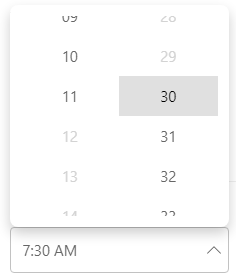**
The following code showcases the use of ClockType property to showcase 24 hour format clock along with time span set for the TimeEditor control.
```csharp
```