# Time Components
## Content
[C1DateTimePicker](/componentone/api/blazor/online-blazor/dotnet-api/C1.Blazor.DateTimeEditors/C1.Blazor.DateTimeEditors.C1DateTimePicker.html) and [C1TimeEditor](/componentone/api/blazor/online-blazor/dotnet-api/C1.Blazor.DateTimeEditors/C1.Blazor.DateTimeEditors.C1TimeEditor.html) support configurable time sections through the [TimeComponents](/componentone/api/blazor/online-blazor/dotnet-api/C1.Blazor.DateTimeEditors/C1.Blazor.DateTimeEditors.TimeComponents.html) property.
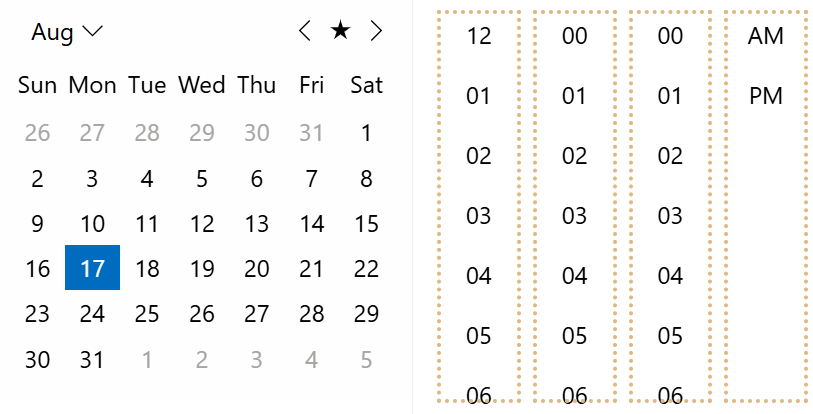
This property controls which parts of a time value are displayed and editable, including hours, minutes, and seconds. Date-time filters also support `TimeComponents`, which allows applications to use consistent time precision across date-time editing and filtering workflows.
***
## Supported Controls
The `TimeComponents` property is available for the following controls.
| Control | @cols=2:Namespace |
| ------- | --------- | --------- |
| `C1DateTimePicker` | `C1.Blazor.DateTimeEditors` |
| `C1TimeEditor` | `C1.Blazor.DateTimeEditors` |
| `DateTimeFilter` | `C1.Blazor.DataFilter` |
| `DateTimeOffsetFilter` | `C1.Blazor.DataFilter` |
| `DateTimeRangeFilter` | `C1.Blazor.DataFilter` |
| `DateTimeOffsetRangeFilter` | `C1.Blazor.DataFilter` |
## Supported Time Components
`TimeComponents` determines which time sections are visible and editable in the target control.
| Value | @cols=2:Description |
| ----- | ----------- | ----------- |
| `Hours` | Displays and enables hour editing. |
| `Minutes` | Displays and enables minute editing. |
| `Seconds` | Displays and enables second editing. |
| `All` | Displays and enables hours, minutes, and seconds. |
Developers can use these values to match the required level of time precision. For example, a scheduling interface may require only hours and minutes, while an event-tracking workflow may require second-level precision.
### Examples
A common configuration is to display only hours and minutes for general date/time entry.
```auto
```
A full time-editing scenario can include seconds.
```auto
```
Date-time filters can use the same property to keep filtering precision aligned with the rest of the application.
```auto
```
***
## AM/PM Designator
AM/PM designator visibility depends on the control type and time configuration.
For `C1TimeEditor`, the control does not provide a `Format` property. The AM/PM designator is displayed when `TimeComponents` includes `TimeComponents.Hours` and `ClockType` is set to `ClockType.Type12`.
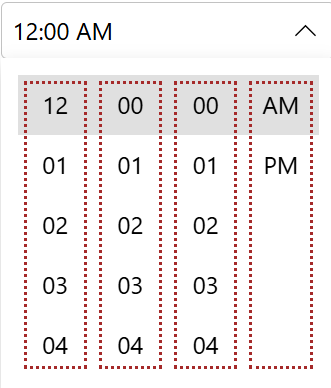
For `C1DateTimePicker`, the `Format` property determines whether the control uses a 12-hour or 24-hour clock. The AM/PM designator is displayed only when the format is a custom format that includes an hour component and `TimeComponents` includes `TimeComponents.Hours`.
| Control | @cols=2:Designator Visibility |
| ------- | --------------------- | --------------------- |
| `C1TimeEditor` | Displayed when `TimeComponents` includes `Hours` and `ClockType` is `Type12`. |
| `C1DateTimePicker` | Displayed when the custom `Format` includes hours and `TimeComponents` includes `Hours`. |
Date-time filter controls do not use this automatic AM/PM designator behavior.
***
## Time Components in Filters
Date-time filters in `C1DataFilter` support the same `TimeComponents` property used by editor controls.
This allows applications to expose only the required time sections in filter editors and maintain consistent precision between editing and filtering workflows.
***
## Limitations
| Limitation | @cols=2:Description |
| ---------- | ----------- | ----------- |
| `TimeComponents` is independent of format and culture | The property is not derived automatically from `Format` or the current culture settings |