# Elements
Blazor Edition provides the DatePicker control which allows you to select and edit date values. Learn more about DatePicker and its elements in the Blazor documentation.
## Content
**DateTimeEditors for Blazor** includes the DatePicker control, a simple control which allows you to display and edit date values. The interface of the DatePicker control looks similar to the following image with which you can choose a date from a drop-down calendar at run time:
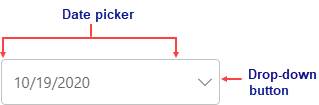
The **DatePicker** control consists of the following elements:
* **Date picker**
The date picker element shows the selected date.
* **Drop-down button**
The drop-down button opens a calendar from where you can select a date to display in the date picker.