# Date Validation

Blazor Calendar supports date validation to restrict invalid data selection by user. Learn more about date validation in the calendar control in Blazor documentation.

## Content


Calendar control has a built-in validator, [ItemValidator](/componentone/api/blazor/online-blazor/dotnet-api/C1.Blazor.Calendar/C1.Blazor.Calendar.C1Calendar.ItemValidator.html) that lets you control the type of data or the value that users can select from the calendar. All you need to do is create a validation function, which is assigned to ItemValidator to allow or restrict the selection of dates by the user. This kind of validation is useful while planning your work sprints, workout days or diet plan.<br />The following GIF shows how the Calendar control behaves after applying validation.
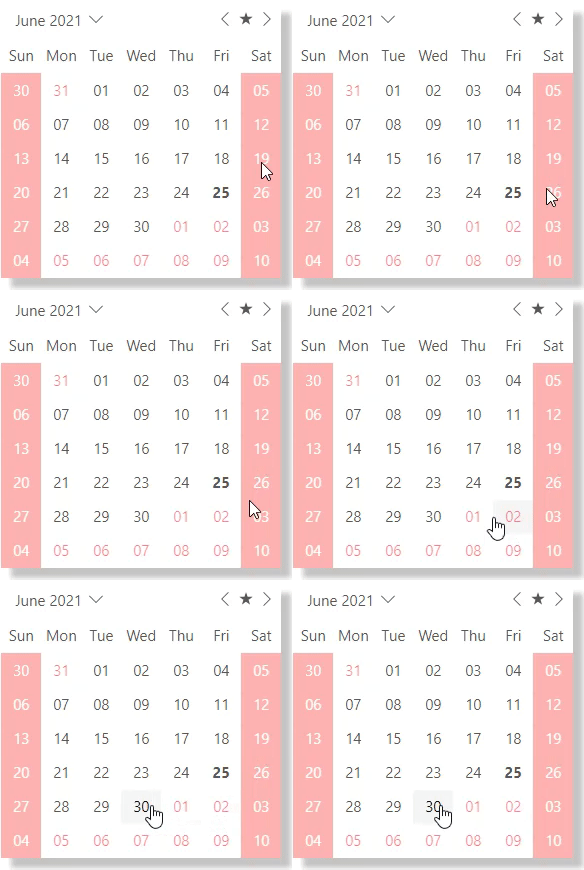
![Date validation performed in Blazor Calendar control](https://cdn.mescius.io/document-site-files/images/f5b600ba-f1a7-4f89-a20c-aa6c0c35880d/images/calendar-date-validation.gif)

In the following example, ItemValidator function is created to determine the valid dates for selection so that a user can only select a weekday in the calendar control.

```DATEVALIDATION
@using C1.Blazor.Calendar
@using C1.Blazor.Core
@using System;
<style>
    .c1-calendar {
        -webkit-box-shadow: 10px 10px 5px 0px rgba(0,0,0,0.23);
        -moz-box-shadow: 10px 10px 5px 0px rgba(0,0,0,0.23);
        box-shadow: 10px 10px 5px 0px rgba(0,0,0,0.23);
        margin: 20px;
    }
    .custom-slot {
        width: 100%;
        height: 100%;
        justify-content: center;
        align-items: center;
        display: flex;
    }
    .non-available-slot {
        color: white;
        background: red;
        opacity: 0.3;
    }
    .adjacent-slot {
        color: red;
        opacity: 0.5;
    }
</style>
<C1Calendar HeaderMonthFormat="MMMM" ItemValidator="ItemValidator">
    <DaySlotTemplate>
        @if (!ItemValidator((DateTime)context.Date))
        {
            <div class="custom-slot non-available-slot">@context.Date.ToString("dd")</div>
        }
        else if (context.IsAdjacent)
        {
            <div class="custom-slot adjacent-slot">@context.Date.ToString("dd")</div>
        }
        else
        {
            @context.Date.ToString("dd")
        }
    </DaySlotTemplate>
</C1Calendar>
@code
{
    bool ItemValidator(DateTime date)
    {
        return date.DayOfWeek != DayOfWeek.Saturday && date.DayOfWeek != DayOfWeek.Sunday;
    }
}
```