# WebDesigner Custom
This topic describes the working sample on WebDesigner UI customization.
## Content
This sample shows how to use the [WebDesigner API](/activereportsnet/docs/v20.1/developers/create-applications/web-designer-application/web-designer-api) to create a customized UI for ActiveReports WebDesigner with an ASP.NET Core back end.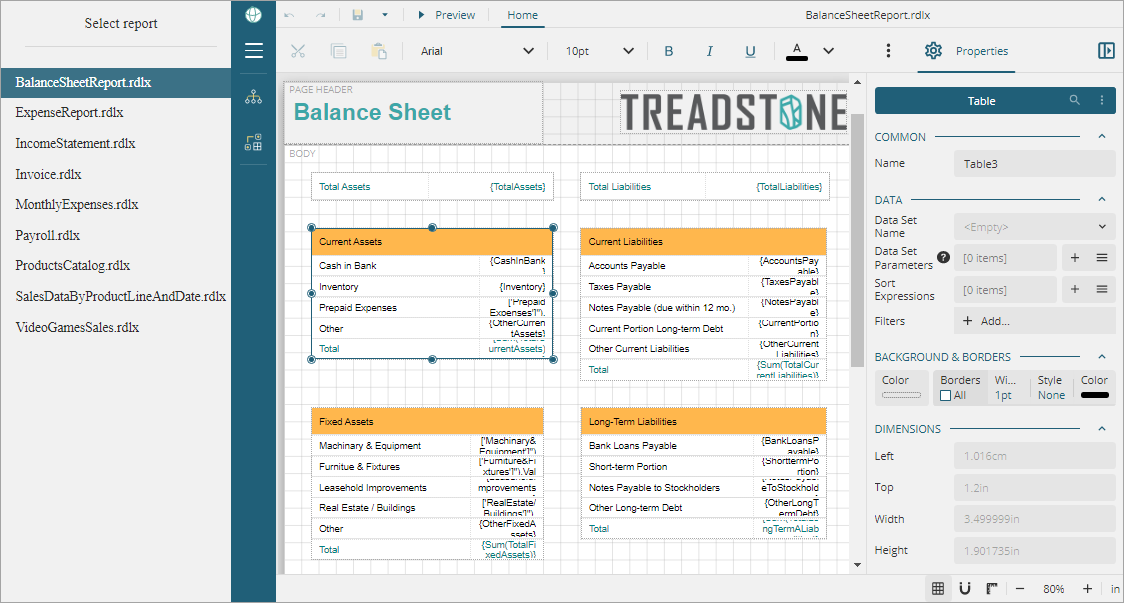
### Sample Location
**C#**
[https://github.com/activereports/WebSamples20/tree/main/WebDesigner_Custom](https://github.com/activereports/WebSamples19/tree/main/WebDesigner_Custom)
### Details
Some of the customizations demonstrated in the sample are shown below. You can check the **Index.cshtml** page of the sample for complete implementation.
* Use a **custom logo** (white labeling)
```auto
menu: { logo: { custom: { type: 'css', class: 'example-icon' } }
```
* Hide **About** button
```auto
appBar: { aboutButton: { visible: false } }
```
* Hide **File** menu
```auto
documents: { fileView: { visible: false }
```
* **Lock the report layout**, that is, disable the operations that modify the report layout structure
```auto
lockLayout: true
```
* Hide **ToolBox**
```auto
menu: { toolBox: { visible: false }}
```
* Hide **Parameters tab**, the design area for designing a custom parameter pane
```auto
appBar: { parametersTab : { visible: false }}
```
* Hide **Data tab**
```auto
data: { dataTab: { visible: false }}
```
Hiding **Data tab** hides the options such as data sources, data sets, parameters, and common values.
* Hide **Properties Mode** button that helps switch between the Advanced and Basic properties of the report elements
```auto
statusBar: { propertiesModeButton: { visible: false }}
```
* Limit font list to limited font families
```auto
fonts : [
{ header: 'Questionable Choice' },
{ label: 'Pretty Font', value: 'Comic Sans MS' },
{ header: '' },
'Arial',
'Courier New',
'Times New Roman'
]
```
* Property grid uses the **Basic** mode to show the properties of report elements
```auto
propertyGrid: { mode:'Basic'}
```
## See Also
#### Developers
[WebDesigner API](/activereportsnet/docs/v20.1/developers/create-applications/web-designer-application/web-designer-api)