# Print in Desktop Viewers
The advanced report printing options in ActiveReports Viewer allow end-users to specify a printer and set options like page scale, page margins, and watermark.
## Content
The advanced report printing options in ActiveReports Viewer allow end-users to specify a printer and set options like page scale, page margins, and watermark.
## Set Advanced Print Options
1. In the Viewer toolbar, click the **Print** button. See [Windows Forms Viewer](/activereportsnet/docs/v20.1/report-readers/desktop-viewers/windows-forms-viewer) for information on the Viewer toolbar.
2. In the Print dialog, click **Advanced**.
3. In the Page Setup dialog, go to the **Layout** tab to set page scaling and page margins, and **Watermark** tab to set watermark text.
| Property | Description |
| --- | --- |
| **Layout** | Set page scaling and page margins.
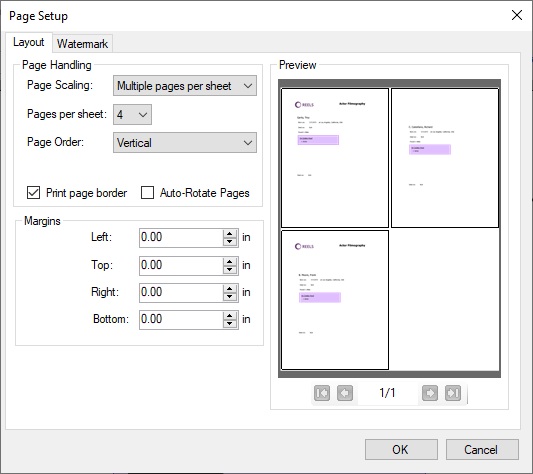 |
| Page Scaling | Choose from any of the following options to set the page scaling: * Fit to printable area * Shrink to printable area * Multiple pages per sheet * Booklet |
| Pages per sheet | Specify the pages per sheet in case you select 'Multiple pages per sheet' in 'Page Scaling'. |
| Page order | Specify the page order in case you select 'Multiple pages per sheet' in 'Page Scaling'. |
| Print page border | Select whether to print the page border from: * Horizontal * Horizontal Reversed * Vertical * Vertical Reversed |
| Auto-Rotate Pages | Select the check-box if you want to set the page orientation based on the content and the page size. |
| Margins | Enter the values for the Left, Top, Right, and Bottom margins for the page. |
| **Watermark** | Specify the watermark text and other settings.
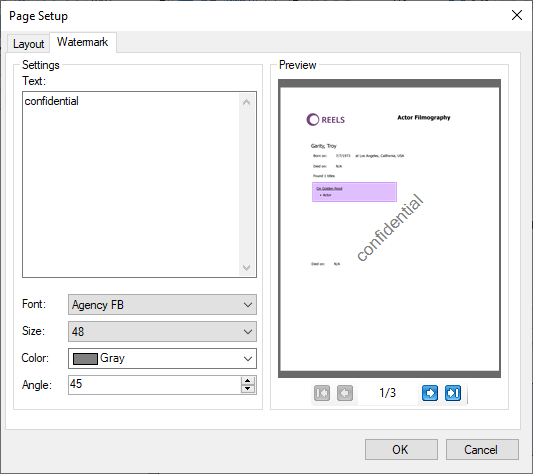 |
| Text | Specify the watermark text. |
| Font | Specify the font style of the text. |
| Size | Specify the font size of the text. |
| Color | Set a color for the watermark text. |
| Angle | Enter a numeric value between 0 and 360. A value of 0 renders straight left-to-right text. A value of 180 renders inverted text. |
## See Also
[Print Presets](/activereportsnet/docs/v20.1/report-readers/desktop-viewers/export-in-desktop-viewers/print-presets)
#### Developers
[Print Reports](/activereportsnet/docs/v20.1/developers/printing)