# Stored Procedure as Dataset
This topic provides steps to add a parameterized stored procedure as a data set.
## Content
A stored procedure is a group of SQL statements that encapsulate a set of operations or queries to execute on a database.
Follow the below steps to add a parameterized stored procedure as a data set.
1. First, [Connect to OLEDB Data Source](/activereportsnet/docs/v20.1/report-authors/data-binding/data-binding-page-rdl-reports/connect-to-a-data-source/oledb-provider) (here we will connect to Reels.mdb).
2. In the Report Explorer, right-click the data source node and select the **Add Data Set** option or select **Data Set** from the Add button.
1. In the [Add Dataset](/activereportsnet/docs/v20.1/report-authors/data-binding/data-binding-page-rdl-reports/add-dataset) that appears, select the **General** page and enter the name of the dataset as 'SalesDataForStore'. This name appears as a child node to the data source icon in the Report Explorer.
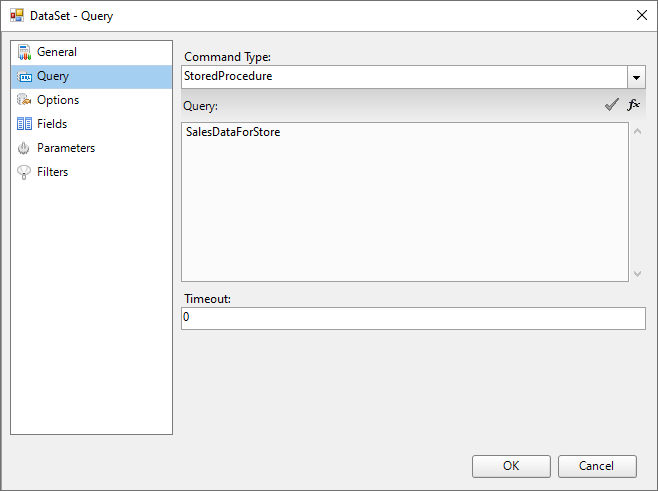
2. On the **Query** page of this dialog, set the **Command Type** to 'StoredProcedure'.
3. In the **Query** field, enter the stored procedure name (e.g. SalesDataForStore).
4. Click the  **Validate** icon to validate the query.
> type=note
> **Note**: You may get an error at this point since the required parameters have not yet been added.
5. Go to the **Parameters** page and add a Parameter using the Add(+) button.
6. On the same page, enter **Name** as StoreID and **Value** as 1002.
7. Select the **Query** page of **DataSet** dialog, and click the **Validate** icon to validate the query and load the fields.
8. Click **OK** to close the dialog. Your data set and queried fields appear as nodes in the Report Explorer.