# Customize the Toolbox
This topic describes the Designer API part that concerns the Toolbox customization.
## Content
You can change the Designer toolbox items to show specific controls or remove a control from the toolbox.
### Add Toolbox panel
The code example below demonstrates adding a Toolbox panel to the Designer using the [Designer.Toolbox](/activereportsnet/api/v20.1/MESCIUS.ActiveReports.Design.Win/GrapeCity.ActiveReports.Design.Designer.html) property.
```csharp.
using GrapeCity.ActiveReports.Design;
using GrapeCity.ActiveReports.Design.ReportExplorer;
class MyForm : Form
{
MyForm()
{
var _designer = new Designer() { Dock = DockStyle.Fill };
var toolbox = new Toolbox { Dock = DockStyle.Right };
_designer.Toolbox = toolbox;
Controls.Add(_designer);
Controls.Add(toolbox);
}
}
```
### Control the Toolbox items
With the [Toolbox.ConfigureToolboxItems](/activereportsnet/api/v20.1/MESCIUS.ActiveReports.Design.Win/GrapeCity.ActiveReports.Design.Toolbox.BaseToolbox.html) method, you can control items that are available in the Toolbox.
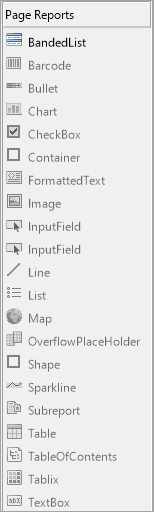
You first need to define a state provider as demonstrated in the sample below.
```csharp
class ToolboxStateProvider : IToolboxUser
{
public bool GetToolSupported(ToolboxItem tool)
{
if (tool.TypeName == "GrapeCity.ActiveReports.Design.DdrDesigner.Designers.BandedList.BandedListDesigner")
return true;
return false;
}
public void ToolPicked(ToolboxItem tool) { }
}
```
After the state provider is configured, you need to configure the Toolbox with it as demonstrated in the sample below.
```csharp
toolbox.ConfigureToolboxItems(new ToolboxStateProvider());
```
### Remove an item from the Toolbox
You can use the [Toolbox.RemoveToolboxItem](/activereportsnet/api/v20.1/MESCIUS.ActiveReports.Design.Win/GrapeCity.ActiveReports.Design.Toolbox.BaseToolbox.html) method together with the [Toolbox.GetToolboxItems](/activereportsnet/api/v20.1/MESCIUS.ActiveReports.Design.Win/GrapeCity.ActiveReports.Design.Toolbox.BaseToolbox.html) method to remove an item from the Toolbox.
```csharp
private static void RemoveBandedListFromToolBox(Toolbox toolbox)
{
//Find the item to be removed.
var bandedList = toolbox.GetToolboxItems()
.OfType()
.Single(items => items.TypeName.EndsWith("BandedListDesigner"));
//Remove the banded list item from the toolbox.
toolbox.RemoveToolboxItem(items);
}
```