# Unbound Data
This ActiveReports sample demonstrates how to create a dataset for a Section report and display the report unbound data.
## Content
The Unbound Data sample demonstrates how to create a dataset for a Section Report and use the FetchData event to populate the Fields collection to display the report unbound data.
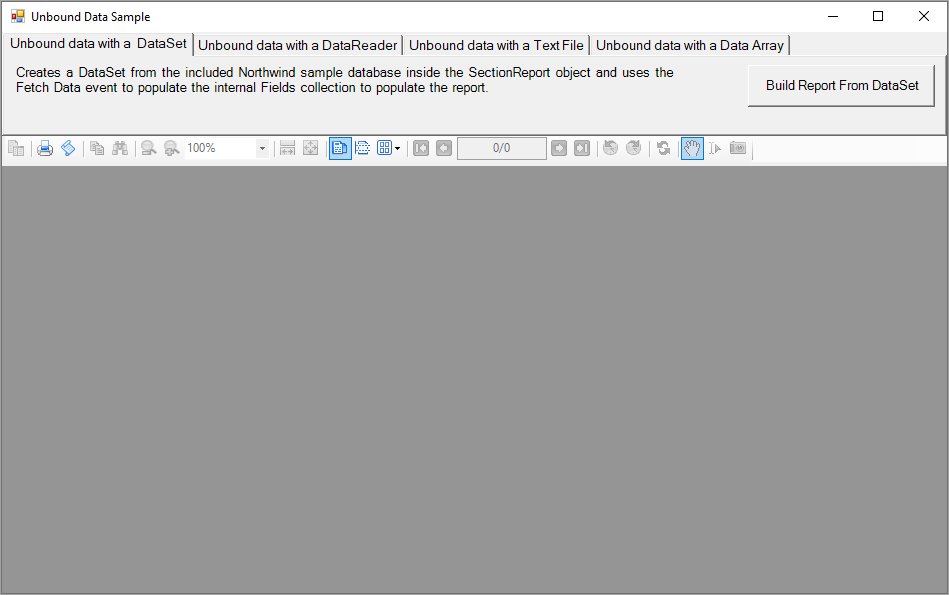
When you run the sample, the Viewer control displays the form with four tabs, each with a different dataset binding technique. Click to select a tab, and then click the **Build Report From** button to create the report with unbound data.
Sample Location
Visual Basic.NET
[https://github.com/activereports/Samples19/tree/main/DataBinding/Section/UnboundData/VB.NET](https://github.com/activereports/Samples19/tree/main/DataBinding/Section/UnboundData/VB.NET)
C#
[https://github.com/activereports/Samples19/tree/main/DataBinding/Section/UnboundData/C#](https://github.com/activereports/Samples19/tree/main/DataBinding/Section/UnboundData/C%23)
Run-Time Features
* **Unbound data with a DataSet**
Creates a data set from the included Northwind sample database inside the SectionReport object and uses the FetchData event to populate the internal Fields collection to display the report data.
* **Unbound data with a DataReader**
Creates a data reader from the included Northwind sample database inside the SectionReport object and uses the FetchData event to populate the internal Fields collection to display the report data.
* **Unbound data with a Text File**
Sets the Invoice.txt file as a data source for the SectionReport object and uses the FetchData event to populate the internal Fields collection to display the report data.
* **Unbound data with a Data Array**
Creates a data array from the included sample text file inside the SectionReport object and uses the FetchData event to populate the internal Fields collection to display the report data.
Project Details
MainForm
This is the main form of the sample that uses the ActiveReports **Viewer** control in the bottom section of the form, and a panel docked to the top contains four tabs, each with a different data binding technique. Click to select a tab, and then click the button on the tab to display the report with unbound data.
UnboundDAInvoice report
The Invoice report for the **Unbound data with a Data Array** option. The report consists of the page header, group header, detail, group footer and page footer sections. The detail section contains information on the order details, the group header provides grouping data functions by using its **DataField** property.
For the details on the Invoice report, see the [Bound Data Sample](/activereportsnet/docs/v19.2/samples/samples-ar/data-binding-sample/section-data-binding/ar-sam-bound-data) topic.
UnboundDRInvoice report
The Invoice report for the **Unbound data with a DataReader** option. The report consists of the page header, group header, detail, group footer and page footer sections. The detail section contains information on the order details, the group header provides grouping data functions by using its **DataField** property.
For the details on the Invoice report, see the [Bound Data Sample](/activereportsnet/docs/v19.2/samples/samples-ar/data-binding-sample/section-data-binding/ar-sam-bound-data) topic.
UnboundDSInvoice report
The Invoice report for the **Unbound data with a DataSet** option. The report consists of the page header, group header, detail, group footer and page footer sections. The detail section contains information on the order details, the group header provides grouping data functions by using its **DataField** property.
For the details on the Invoice report, see the [Bound Data Sample](/activereportsnet/docs/v19.2/samples/samples-ar/data-binding-sample/section-data-binding/ar-sam-bound-data) topic.
UnboundTFInvoice report
The Invoice report for the **Unbound data with a Text File** option. The report consists of the page header, group header, detail, group footer and page footer sections. The detail section contains information on the order details, the group header provides grouping data functions by using its **DataField** property.
For the details on the Invoice report, see the [Bound Data Sample](/activereportsnet/docs/v19.2/samples/samples-ar/data-binding-sample/section-data-binding/ar-sam-bound-data) topic.