# Custom Resource Locator
The Custom Resource Locator sample demonstrates a custom implementation of the resource locator to load pictures from the user's Pictures or My Pictures directory.
## Content
The Custom Resource Locator sample demonstrates a custom implementation of the resource locator to load pictures from the user's **Pictures** or **My Pictures** directory. In general, you can use a resource locator in a report to find any resources that a report may require.
### Sample Location
**Visual Basic.NET**
[https://github.com/activereports/Samples19/tree/main/Advanced/PageAndRDLX/CustomResourceLocator/VB.NET](https://github.com/activereports/Samples19/tree/main/Advanced/PageAndRDLX/CustomResourceLocator/VB.NET)
**C#**
[https://github.com/activereports/Samples19/tree/main/Advanced/PageAndRDLX/CustomResourceLocator/C#](https://github.com/activereports/Samples19/tree/main/Advanced/PageAndRDLX/CustomResourceLocator/C%23)
### Details
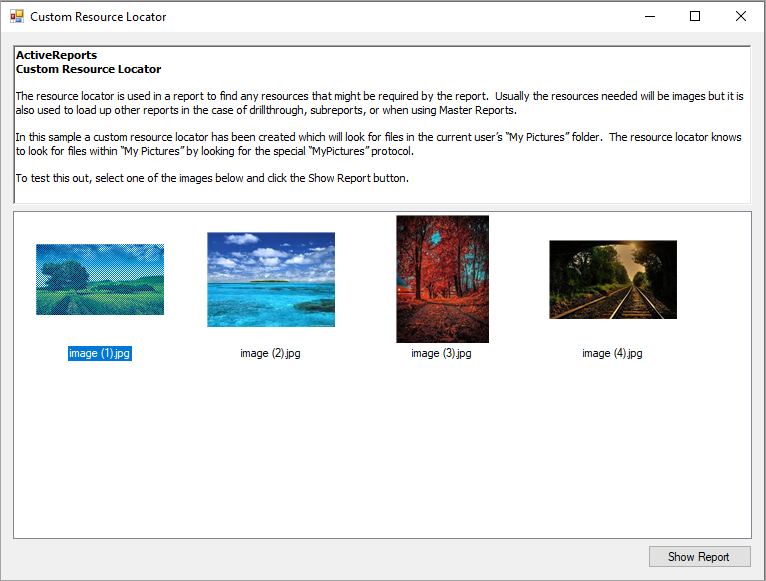
When you run this sample, you see the **MainForm** with the list of images from the **Pictures** or **My Pictures** directory. Select any image and click the **Show Report** button. A report with the selected image opens in the **PreviewForm**.
> type=warning
> **Caution**: To run this sample properly, you must have image files in your pictures directory. If the directory does not contain any pictures, you should add them to the folder manually.
The sample consists of:
* Resources folder: This folder contains the **Description.rtf** file that contains a summarized content of the resource locator that gets displayed inside the RichTextBox control on the **MainForm** at run time. This folder also contains the **NoImage.bmp** image file that is used if there is no image in the pictures directory.
* DemoReport.rdlx: The DemoReport.rdlx displays the selected image. This report contains two [TextBox](/activereportsnet/docs/v19.2/report-authors/report-controls/report-controls-page-rdl-report/textbox) controls and one [Image](/activereportsnet/docs/v19.2/report-authors/report-controls/report-controls-page-rdl-report/image) control, which display the image name, the image type and the image at run time after you click the **Show Report** button on the **MainForm**.
* MainForm: This is the main form of this sample that appears when you run the sample. This form contains the RichTextBox, the ListView and the Button controls. The RichTextBox control displays the summarized information saved in the **Description.rtf** file about the resource locator and the sample. The ListView control gets populated with the images located in the **My Pictures** directory; the Button control is used to generate the report with the selected image. Right-click the form and select **View Code** to see how to load text in the RichTextBox control and images in the ListView control. It also contains code that displays the **DemoReport.rdlx** on the **showReport\_Click** event.
* MyPicturesLocator: This file is an internal class that contains code that looks for resources in the **My Pictures** directory.
* PreviewForm: This form uses the ActiveReports **Viewer** control to display the **DemoReport.rdlx** with the selected image. Right-click the form and select **View Code** to see how to load the report into the Viewer.