# Manage ActiveReports Dependencies
Learn how to add ActiveReports assemblies in your project by installing NuGet packages either from local source or directly from the NuGet website.
## Content
The ActiveReports dependencies in Visual Studio projects can be added, updated, or removed using **NuGet** package manager. How the dependencies are managed depends on the location of package - at a local source or public source. The ActiveReports packages are available in the local directory on installing ActiveReports using the installer. The packages are also available publicly on the [NuGet](https://www.nuget.org/packages?q=MESCIUS.ActiveReports) website. For the list of packages, see [Available Packages](/activereportsnet/docs/v19.2/devops/install-activereports/packages).
The following sections elaborate adding the ActiveReports assemblies in your project by either installing NuGet packages from local source or directly from the NuGet website.
### Installing Packages from Local Source
You must first run the installer to obtain the **NuGet** packages locally - **C:\\Program Files (x86)\\MESCIUS\\ActiveReports 19\\NuGet**. See [Install ActiveReports](/activereportsnet/docs/v19.2/devops/install-activereports) for the steps on installation using MSI file. Then, create the NuGet package source to add the NuGet feed URL into your NuGet settings in Visual Studio, as follows:
**1\. Configure local NuGet package source**
1. Open **NuGet.Config** file placed here:
C:\\Users\\[UserName\]\\AppData\\Roaming\\NuGet.
2. Modify the content of NuGet.Config as follows. This adds a key that directs to the path where NuGet packages are available locally.
```xml
```
**2\. Install Packages**
1. Open Visual Studio.
2. Create any application (any target that supports .NET Standard 2.0).
3. Right-click the project in Solution Explorer and choose **Manage NuGet Packages**.
4. In the **Package source** on top right, select **ActiveReports** (key added in NuGet.config).
5. Click **Browse** tab on top left and search for any package, say 'MESCIUS.ActiveReports'.
6. On the left panel, select **MESCIUS.ActiveReports**.
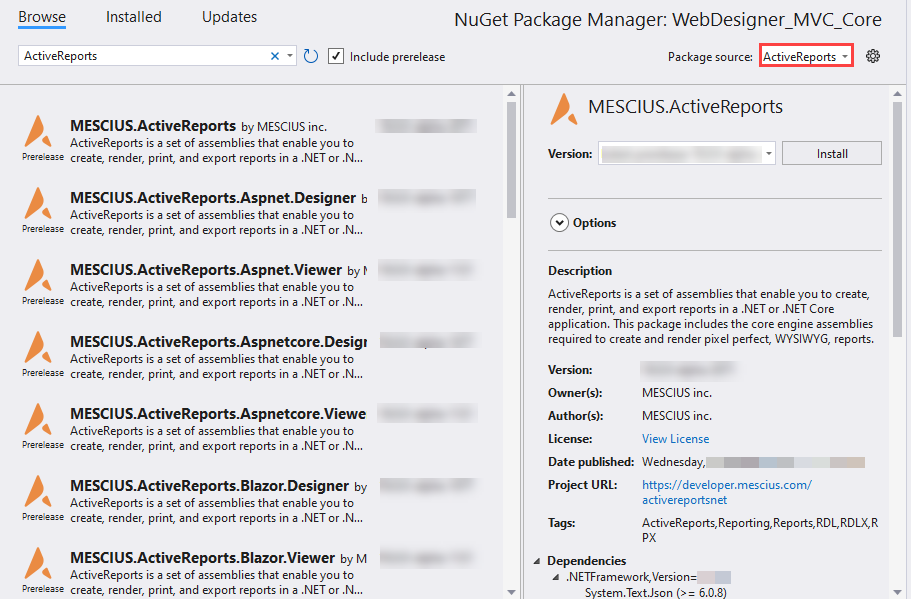
7. On the right panel, click **Install**.
8. In the **License Acceptance** dialog, select **I Accept** to proceed the installation.
### Installing Packages from NuGet
ActiveReports 19 references are available through **NuGet** and can be obtained directly from website - [https://www.NuGet.org/packages?q=MESCIUS.ActiveReports](https://www.NuGet.org/packages?q=MESCIUS.ActiveReports). When you add reference to **MESCIUS.ActiveReports** package, a set of core engine assemblies are added to the application. Use following steps to find and install the NuGet packages in your application:
1. Open Visual Studio.
2. Create any application (any target that supports .NET Standard 2.0).
3. Right-click the project in Solution Explorer and choose **Manage NuGet Packages**.
4. In the **Package source** on top right, select **NuGet.org**.
5. Click **Browse** tab on top left and search for 'MESCIUS.ActiveReports'.
6. On the left panel, select MESCIUS.ActiveReports.
7. On the right panel, click **Install**.
8. In the **License Acceptance** dialog, select **I Accept** to proceed the installation.
For more information on NuGet configurations, please see [Common NuGet configurations](https://learn.microsoft.com/en-us/nuget/consume-packages/configuring-nuget-behavior) and [NuGet Configuration Settings](https://learn.microsoft.com/en-us/nuget/reference/nuget-config-file) articles by Microsoft.
> type=note
> **Note**: The assemblies are available in the packages at the following location:
>
> * if installer is used: C:\\Program Files (x86)\\MESCIUS\\ActiveReports 19\\NuGet\\{_Package name_}\\lib\\net472\\{_Assembly_}
> * if a package is installed in an application: [_App name_\]\\packages\\{Package name}\\lib\\net472\\{_Assembly_}