# Draw on the Canvas of Rendered Report
Learn about drawing on the canvas of rendered section report document.
## Content
At times, you may want some graphics (such as shapes, text, or images) to be rendered on top of your report, just like an overlay. A simple scenario is showing a warning about a limited or expired version of your application on top of the rendered report.
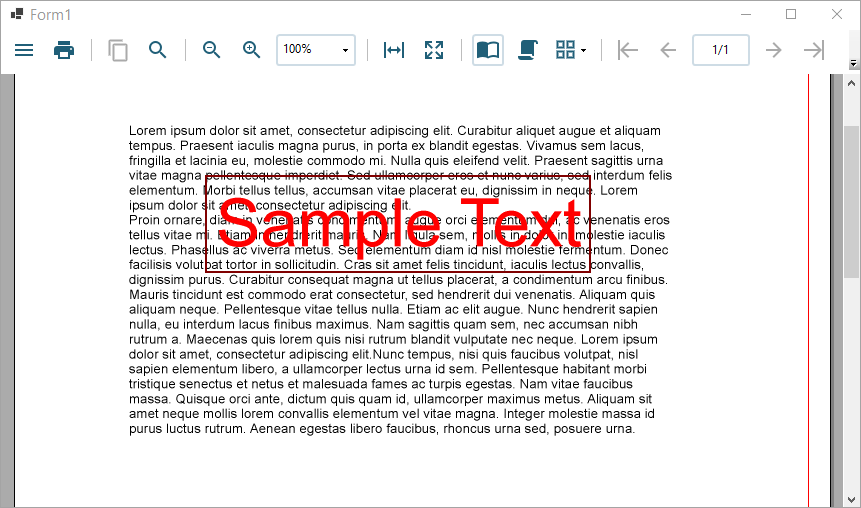
The following sample code demonstrates drawing a rectangular shape with the [DrawRect()](/activereportsnet/api/v19.2/MESCIUS.ActiveReports/GrapeCity.ActiveReports.Document.Section.Page.html#DRAWRECT) method and drawing a text with the [DrawText()](/activereportsnet/api/v19.2/MESCIUS.ActiveReports/GrapeCity.ActiveReports.Document.Section.Page.html#DRAWTEXT) on a section report. Note that these methods must be called after the [report.Run()](/activereportsnet/api/v19.2/MESCIUS.ActiveReports/GrapeCity.ActiveReports.SectionReport.html#RUN), since you are drawing on the canvas of a rendered report.
```csharp
var report = new SectionReport();
report.LoadLayout(XmlReader.Create(Application.StartupPath + "\\Report.rpx"));
report.Run();
report.Document.Pages[0].PenWidth = 3;
report.Document.Pages[0].ForeColor = Color.Maroon;
report.Document.Pages[0].DrawRect(2, 2, 4, 1);
report.Document.Pages[0].Font = new GrapeCity.ActiveReports.Document.Drawing.Font("Arial", 50);
report.Document.Pages[0].ForeColor=Color.Red;
report.Document.Pages[0].DrawText("Sample Text",2.1f, 2.1f,4 , 1f);
viewer1.LoadDocument(report.Document);
```
## See Also
[Create a Report or Load an Existing Report](/activereportsnet/docs/v19.2/developers/working-with-reports-devs/section-report-developers/create-new-section-report)