# InputField Control for Editable PDFs
This is a tutorial on how to create editable PDF forms, using the InputField controls.
## Content
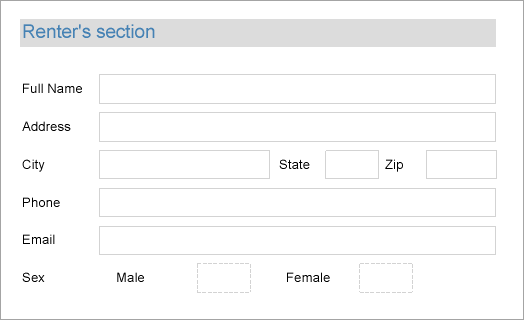
We are going to create a PDF form, using the InputField controls, where a user, besides entering text information, may also specify Yes (check) or No (uncheck) for such information like Sex, Employment Status, etc.
The final report will look as shown.
### Design Report Layout
1. Drag and drop the **TextBox** control onto the report designer and set its **Value** property to Renter's section. This is the form's heading.
2. Drag and drop the TextBox controls below the Renter's section text; these controls will be the captions to the user's answers. Set the **Value** property of each of these controls to the following values:
- TextBox2: Full Name
- TextBox3: Address
- TextBox4: City
- TextBox5: State
- TextBox6: Zip
- TextBox7: Phone
- TextBox8: Email
3. Now drag and drop the **InputField** controls next to the TextBox controls added at the previous step. These blank fields are required to be filled by the users filling the PDF form.
4. Set the InputField's **InputType** property to Text.
5. Drag and drop some more TextBox controls and set them to the following values in the **Value** property.
- Value9: Sex
- Value10: Male
- Value11: Female
6. Now drag and drop the **InputField** controls next to the TextBox added at the previous step. These blank fields are required to be filled as yes or no using the checkboxes.
7. Set the InputField's **InputType** property to CheckBox.
8. Set **Required** property for some fields that you want to make mandatory before submitting the form.
9. Improve the appearance of the controls and preview the report.
10. Export the report to PDF format. Users can now enter the text in the blank fields and also enter their choices as yes (check) or no (uncheck) in the editable checkboxes.
## See Also
[InputField](/activereportsnet/docs/report-authors/report-controls/report-controls-page-rdl-report/inputfield)
[Quick Start](/activereportsnet/docs/report-authors/standalone-designer-app/create-multi-section-rdl)