# Loading reports as modules
Learn how to load a report to ActiveReportsJS Report Viewer component using web-pack loaders
## Content
Modern front-end frameworks, such as Angular, React, or Vue, are using [webpack](https://webpack.js.org/concepts/) under the hood to transpile the application's code into instructions consumable in a browser. We recommend including report templates into module [dependency graph](https://webpack.js.org/concepts/dependency-graph/) so that they will go through webpack with the following benefits:
* Report templates get minified and bundled together to avoid extra network requests.
* Missing report templates cause compilation errors instead of `Not Found` errors for your users.
* Result filenames include content hashes, so you don't need to worry about browsers caching their old versions.
* TypeScript simplifies the experience of writing a code that modifies the report template at runtime.
### Webpack loaders
Webpack's [loaders](https://webpack.js.org/concepts/loaders/) feature allows us to `import` **anything** directly from JavaScript modules.
ActiveReportsJS uses [JSON format](https://www.json.org/json-en.html) and `rdlx-json` extension for report template files. Webpack includes the [json-loader](https://www.npmjs.com/package/json-loader) library that you can use to load JSON files with a custom extension. You can install this package into the Angular, React, or Vue application by running the `npm install -D json-loader` or `yarn add json-loader -D` command from the application's root folder.
### Loading reports with TypeScript
TypeScript becomes a primary language for modern web-application development. Angular, React, and Vue frameworks offer project boilerplates that written in TypeScript. It has a lot of great features, among them [WildCard Module Declaration](https://www.typescriptlang.org/docs/handbook/modules.html#wildcard-module-declarations) that allows supplying custom modules, like `*.rdlx-json` files with strong typing. The structure of ActiveReportsJS templates is defined in the [RDLReportDefinition](https://developer.mescius.com/activereportsjs/api/modules/Core.Rdl) interface that is part of the [@mescius/activereportsjs](https://www.npmjs.com/package/@mescius/activereportsjs) package. You can add a file called `activereports.d.ts` in the root folder of an Angular, React, or Vue application and add the following content into this file:
```js
declare module '*.rdlx-json' {
import { RDLReportDefinition } from '@mescius/activereportsjs/core';
const report: RDLReportDefinition;
export default report;
}
```
After that, you can import report templates using the [inline loaders](https://webpack.js.org/concepts/loaders/#inline).
```js
// eslint-disable-next-line import/no-webpack-loader-syntax
import report from '!json-loader!../reports/Products.rdlx-json';
```
The name of the report template module consists of the loader name `json-loader`, the relative path to the `rdlx-json` file, the separator between them, and the prefixing `!`.
Alternatively, you can add a custom webpack [configuration](https://webpack.js.org/concepts/loaders/#configuration) that specifies the rules for loading `*.rdlx-json` modules. However, it requires additional setup that is framework-specific and therefore we don't describe it here.
IDE's such as Visual Studio Code that can recognize Typescript will provide the intellisence for a report template. You can easily modify it at runtime, as shown in the picture below.
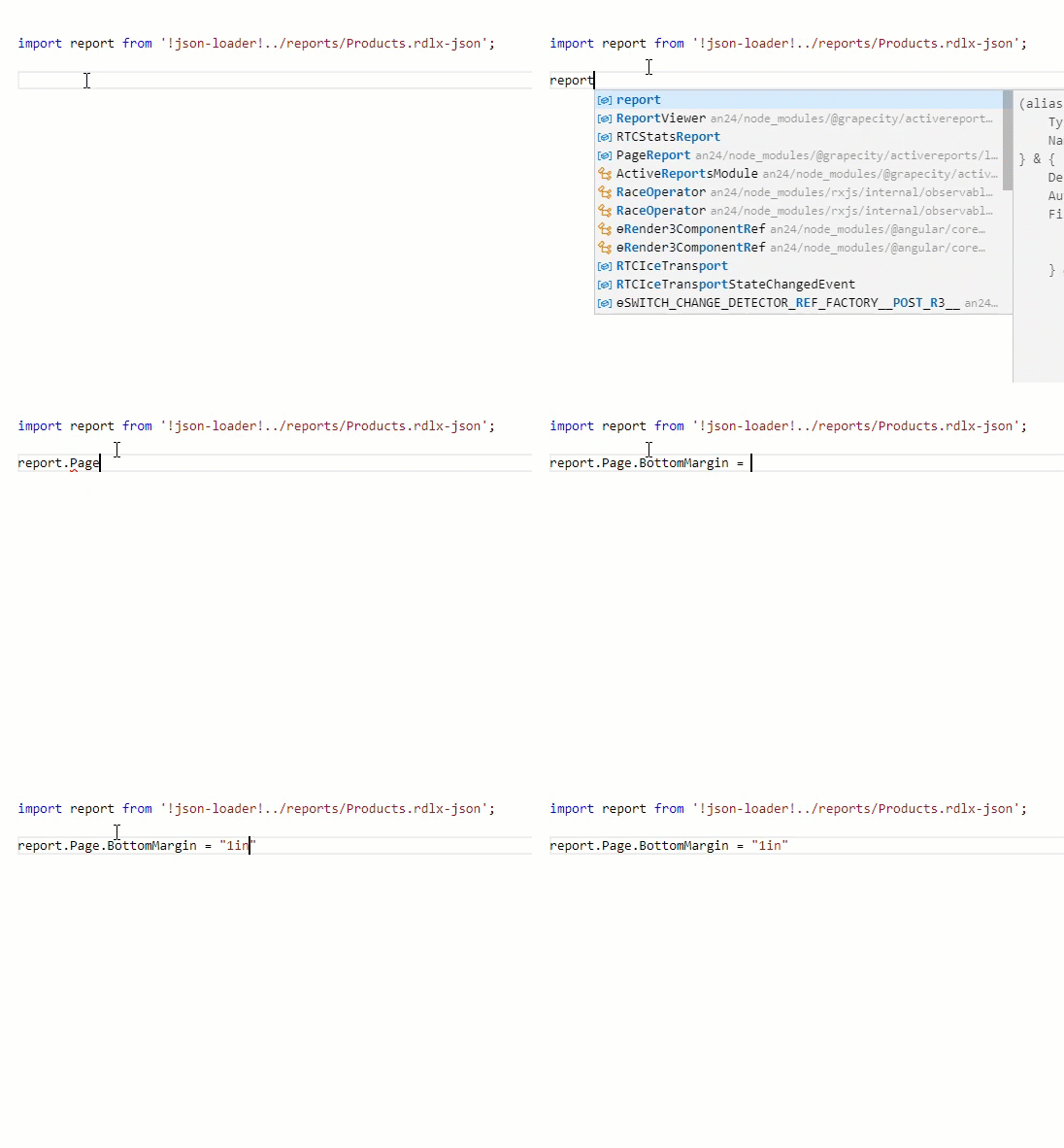
You can use the [viewer.open](https://developer.mescius.com/activereportsjs/api/classes/ReportViewer.Viewer#open) method to load an imported report template into a viewer instance. The following examples show the complete code of Angular, React, and Vue TypeScript components using the described approach.
DOC-DETAILS-TAG-OPEN
DOC-SUMMARY-TAG-OPEN
Angular component
DOC-SUMMARY-TAG-CLOSE
```js
import { Component, ViewChild } from '@angular/core';
import { ViewerComponent } from '@mescius/activereportsjs-angular';
// eslint-disable-next-line import/no-webpack-loader-syntax
import report from '!json-loader!../reports/Products.rdlx-json';
@Component({
selector: 'app-root',
template: `
`,
styleUrls: ['./app.component.css'],
})
export class AppComponent {
@ViewChild(ViewerComponent, { static: false }) reportViewer: ViewerComponent;
onViewerInit() {
this.reportViewer.open(report);
}
}
```
DOC-DETAILS-TAG-CLOSE
DOC-DETAILS-TAG-OPEN
DOC-SUMMARY-TAG-OPEN
React component
DOC-SUMMARY-TAG-CLOSE
```js
import React from "react";
import { Viewer } from "@mescius/activereportsjs-react";
// eslint-disable-next-line import/no-webpack-loader-syntax
import report from "!json-loader!../reports/ProductsReport.rdlx-json";
const ViewerApp: React.FC = () => {
const viewerRef = React.useRef(null);
React.useEffect(() => {
const viewerInstance = viewerRef.current?.Viewer;
viewerInstance?.open(report);
}, []);
return (
);
};
```
DOC-DETAILS-TAG-CLOSE
DOC-DETAILS-TAG-OPEN
DOC-SUMMARY-TAG-OPEN
Vue component
DOC-SUMMARY-TAG-CLOSE
```html
```
DOC-DETAILS-TAG-CLOSE
### Loading reports without TypeScript
If you don't use TypeScript yet, the syntax for loading reports is slightly different:
```js
import * as report from '!json-loader!../reports/ProductsReport.rdlx-json';
```
But you can pass the `report` variable into the [viewer.open](https://developer.mescius.com/activereportsjs/api/classes/ReportViewer.Viewer#open) method precisely as shown in the preceding section.